
title:

Bluetooth button on quick panel

(Post creation time:  

08-10-2023 03:21 PM

)

1387 Views

P

prsnt_paul

Active Level 6

last edited


08-10-2023 03:57 PM


in

 
Hi galaxy watch users..do u know how to add this Bluetooth shortcut icon in quick panel? I can't find the Bluetooth button option in quick panel settings
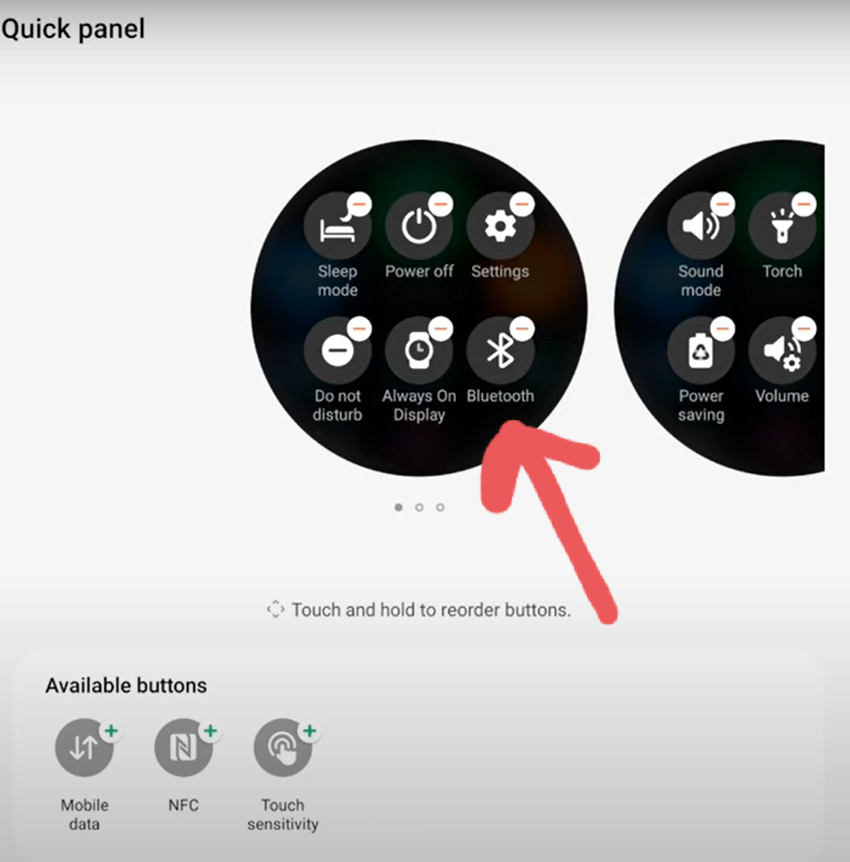
I have seen this bt icon on many galaxy watches. That's why i want to know if there is any particular way to add this

image


    • 4

      08-10-2023 03:48 PM


      in

       
      You have to do this on your watch, Goto last page of quick panel, There touch the + button and you will find option to add Bluetooth there.

      0 likes

      P

      prsnt_paul

      Active Level 6

      08-10-2023 04:18 PM


      in

       
      Nothing happened. Tried resetting my watch multiple times. But the option didn't appear. Your watch variant is lte? or bt?

      0 likes

      P

      prsnt_paul

      Active Level 6

      08-10-2023 04:19 PM


      in

       
      Added a video of quick panel settings of my watch.see there is no bt option available

      0 likes

      4

      08-12-2023 02:14 AM


      in

       
      In this case it seems that it's a difference between LTE and Bluetooth versions. On my LTE watch it's there.

      0 likes

    • C

      ChandanSuthar

      Active Level 1

      01-29-2024 03:23 PM


      in

       
      I have exactly the same question. I have watch 4, Bluetooth version and do not see a BT icon option available in my watch quick panel.

      0 likes

    Related Content

    QUICK PANEL

    Quick Panel

    Quick Panel

    Quick panel