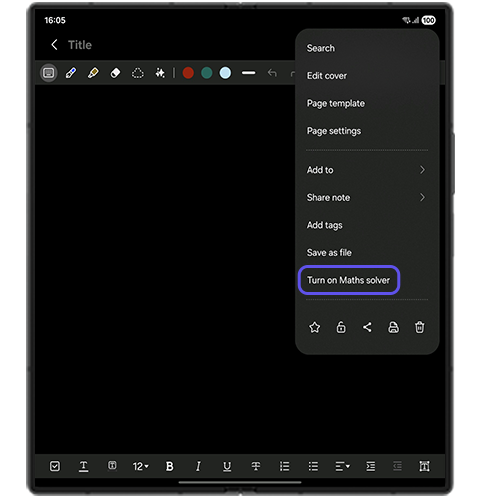
The Maths solver feature in the Notes app is a powerful tool that allows you to solve handwritten or typed math equations using the S Pen or keyboard. Powered by Galaxy AI, this feature provides instant solutions to maths problems, making it a convenient tool for students, professionals, and anyone who needs quick answers.
Note: -
- Screens and Images simulated
- Feature is only available on devices running One UI 8
- Sequences are shortened and simulated
- To use the Math Solver, ensure the Samsung Notes app is updated through the Galaxy Store
- The feature is currently being rolled out gradually and may only be available on large-screen devices, such as tablets and foldables (e.g., Galaxy Tab, Galaxy Z Fold, and Galaxy S Ultra series)
- The accuracy of the Math Solver depends on handwriting recognition. If handwriting is unclear, it may lead to incorrect solutions, particularly for complex equations
- As with any AI-based tool, it is essential to use the Math Solver with caution and verify the results independently when necessary
Click on below image to know about how to Use Maths solver in Notes

sitja38984866367
Active Level 7
last edited
11 months ago
0 likes
You must be a registered user to add a comment here. If you've already registered, please log in. If you haven't registered yet, please register and log in.