
Hello samsung members today I am sharing one hidden security settings in your galaxy smartphone that isAuto blocker most probably seen in models havingKnox security. I saw it was turned off by default in most of the devices. We need to manually turn on that. Basically this feature blocks data leakage when your device is connected to a public USB for charging. To find this go to settings>privacy and security>Additional security settings>Auto blocker.
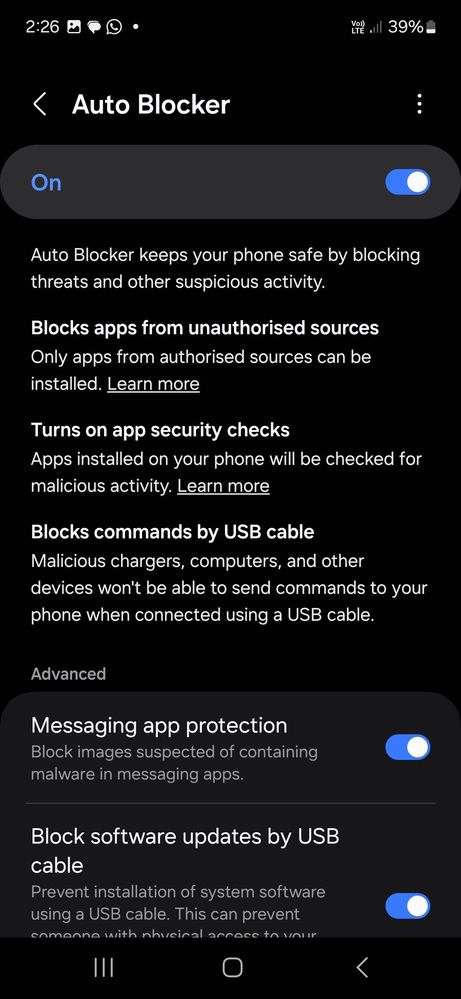
Auto blocker and the settings that must be turn on.
Please Follow me if you likes my post 🙏
unknown_s
Expert Level 5
2 years ago
in
POWE
Active Level 5
2 years ago
in
subaldutta
Active Level 2
2 years ago
in
SherekonShrestha
Active Level 3
2 years ago
in
6203408341
Beginner Level 2
2 years ago
in
LiveYoungLiveFree
Active Level 8
2 years ago
in
Balu449
Beginner Level 4
2 years ago
in
Sandeep0910
Active Level 6
2 years ago
in
Shekhar_Pandey
Expert Level 1
2 years ago
in
Anonymous User
Beginner Level 1
2 years ago
in
Anonymous User
Beginner Level 1
2 years ago
in