
title:

🇮🇳 Galaxy S25 Ultra October 2025 Security Update Released

(Post creation time:  

10-23-2025 08:13 AM

)

2396 Views

A

Ankitastic26

Active Level 8

last edited


10-23-2025 08:13 AM


in

 
Samsung has begun rolling out the October 2025 security update for the Galaxy S25 Ultra, marking the first monthly patch after the One UI 8.0 (Android 16) upgrade that arrived on 18 September 2025 with the September patch. This release focuses on enhanced stability, reliability, and system security following the major software update.
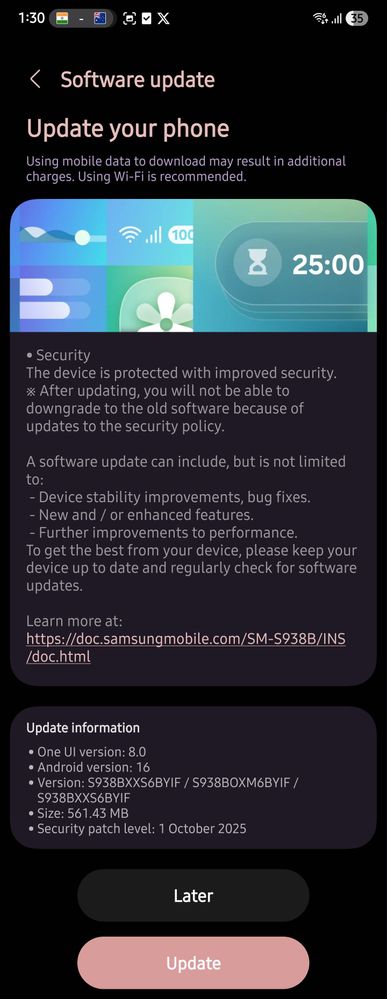
🇮🇳 India (INS)

• One UI version: 8.0
• Android version: 16
• Firmware version: S938BXXS6BYIF / S938BOXM6BYIF / S938BXXS6BYIF
• Update size: 561.43 MB
• Security patch level: 1 October 2025

This Indian release improves device security, system performance, and overall stability, ensuring smoother operation on the latest One UI 8.0 platform.


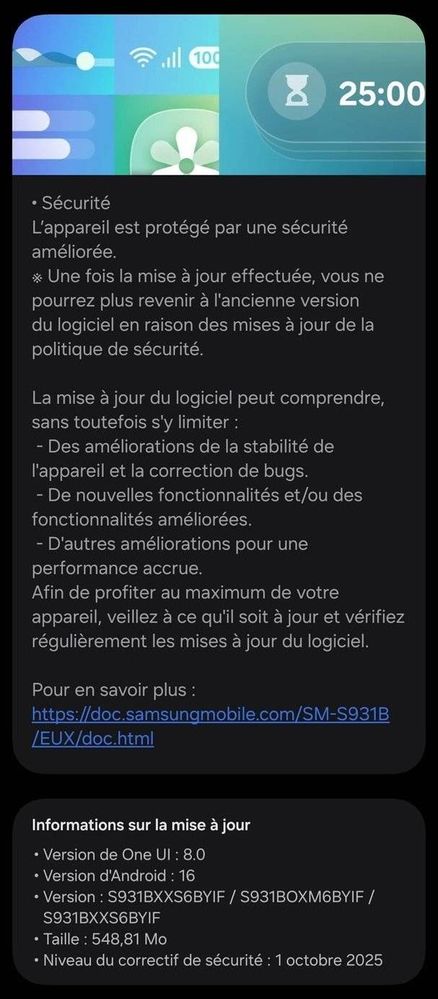
🇪🇺 Europe (EUX)

• One UI version: 8.0
• Android version: 16
• Firmware version: S931BXXS6BYIF / S931BOXM6BYIF / S931BXXS6BYIF
• Update size: 548.81 MB
• Security patch level: 1 October 2025

The European version brings the same October patch improvements focused on maintaining reliability and security across supported regions.


This update doesn’t introduce new features but provides essential stability and security enhancements to keep your Galaxy S25 Ultra performing at its best. The rollout is live in India 🇮🇳 and Europe 🇪🇺, with more regions to follow soon. To check manually, go to Settings → Software update → Download and install.


image
S25 India


image
S25 Europe


  • B

    BiRdMaN

    Expert Level 5

    10-23-2025 08:33 AM


    in

     
    Enjoy
  • Y

    YJG

    Active Level 5

    10-23-2025 08:33 AM


    in

     
    Same camera issue still persists and not resolved...while focusing giving trouble and lot of lense shakes and rattling noise...As its not resolved in this update now its sure its faulty hardware issue face by lot of S25 Ultra users...Samsung must acknowledge and recall all such faulty devices as its very premium flagship phone
    A

    Ankitastic26

    Active Level 8

    10-24-2025 07:18 AM


    in

     
    The issue on the ultrawide camera could be related to the camera module itself rather than software. It’s recommended to visit an authorized Samsung Service Center for a proper hardware inspection you can also try performing a full factory reset after backup, as it might help if the problem is caused by a software glitch, though it’s not guaranteed to fully fix it.
    W

    Winner1001

    Beginner Level 4

    10-24-2025 07:43 AM


    in

     
    Yep soon ill visit a service center. This has been happening on my device from like a month , seems like a hardware issue.Only issue i face is keeping the phone for service as i converted sim to esim and dont really have another phone supporting in esim so will need to activate physical sim again for a while.
    A

    Ankitastic26

    Active Level 8

    10-24-2025 07:59 AM


    in

     
    Yeah, that sounds like the best plan. Since it’s been happening for about a month, a service center check should help confirm if it’s a hardware issue. Totally get the hassle with switching from eSIM to physical SIM just for that.
  • C

    combicard

    Active Level 1

    10-24-2025 02:00 AM


    in

     
    New problem is Network issues now...

    0 likes

    A

    Ankitastic26

    Active Level 8

    10-24-2025 07:25 AM


    in

     
    The network issue appearing after the update could be related to temporary software conflicts or carrier settings. It’s recommended to restart the device and check if the issue continues if the problem still occurs, try performing a full factory reset after backup, and if it doesn’t help, visit a nearby Samsung Service Center to get the hardware and network module checked. You can also wait for the next update, as it may include fixes that resolve this issue.

    0 likes

    Y

    YJG

    Active Level 5

    10-24-2025 02:25 PM


    in

     
    I observed very weired issue...Once I call someone mic is not getting activated and that i come to know when it saw that green indicator not coming on top sometimes once users accept call so voice is not getting heard at other end. I was thinking its network issue but its mic activation issue...if we click mic mute unmute then voice started going

    0 likes

  • M

    MJayanta

    Expert Level 3

    10-24-2025 08:12 AM


    in

     
    When will the October Security Patch Update for A56 5G be released?
    A

    Ankitastic26

    Active Level 8

    10-24-2025 09:37 AM


    in

     
    The Galaxy A56 5G is part of Samsung’s monthly security update schedule, so it’s eligible for regular patches. Since we’re already near the end of October, there’s a high chance the October security patch will roll out very soon, possibly before the month ends. I can’t confirm an exact date, but so far this update hasn’t been released for the A56 5G in any region yet.
    M

    MJayanta

    Expert Level 3

    10-24-2025 04:33 PM


    in

     
    Thank you Ms. Please update a post regarding this update 😊
    A

    Ankitastic26

    Active Level 8

    10-24-2025 05:51 PM


    in

     
    You’re welcome! 😊 Once the Galaxy A56 October update starts rolling out in India, I’ll definitely make a post about it. And if it releases in any other region or there’s any related update, I’ll share that too. Stay tuned. 👍

    0 likes

  • S

    shravi

    Active Level 3

    10-29-2025 06:19 PM


    in

     
    I did my S25ULTRA oct security patch update yesterday i.e. 24th Oct. Although phone is smooth like before didn't found any hiccups. Battery is draining like crazy after update. Even idle overnight drain just doubled from 3-4% to 8% percent. Normal drain is also high.

    Please share your experience
    A

    Ankitastic26

    Active Level 8

    10-30-2025 01:31 AM


    in

     
    I also installed the October update on my Galaxy S25 Ultra, and on the first day I noticed a bit more battery drain. But from the next day everything felt normal again ⟶ battery backup is almost the same as before, and overall performance feels a little smoother and more optimized than the previous version.
    If you still notice unusual drain, you can try turning off the phone once and turning it back on manually. Sometimes a simple reboot helps stop unnecessary background services that might be running after the update. 👍

    0 likes