
Easy Mode lets you use a simpler Home Screen layout and bigger on-screen items. Any customisations you've made to the Home Screen (including themes) will be discarded, and the Screen zoom will be set to the maximum.
[ ] WHAT IS EASY MODE?
Easy Mode is just that - a simplified Home screen interface that is built right into the Android operating system. Simply go into your settings, look for your Home Screen settings and change your Home screen launcher to Easy Mode. Each of the major Android phone brands have their own version with slight variations
[ ] HOW TO ACTIVATE EASY MODE?
STEP1:-
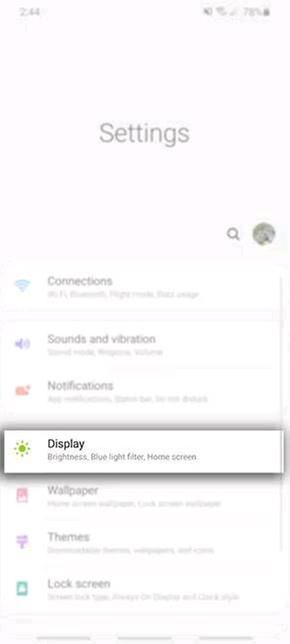
Head into your Settings > Display
STEP2:-
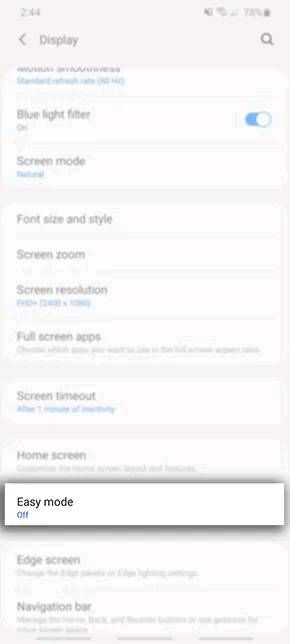
Tap on Easy Mode
STEP3:-
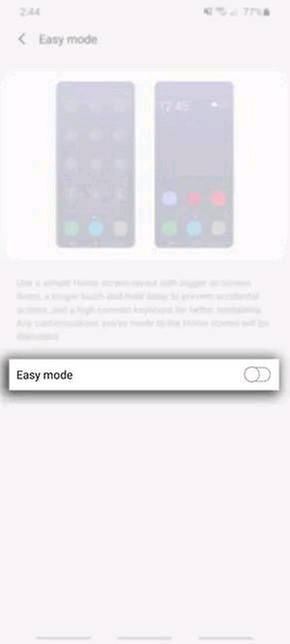
Toggle on Easy Mode
HAVE YOU USED EASY MODE??
ACCORDING TO YOU, WHATS THE BEST THING ABOUT IT?
HELP US KNOW IN THE COMMENTS DOWN BELOW!!
SOURCES:-
https://www.samsung.com/au/support/mobile-devices/using-easy-mode/
COURTESY:-
KARAN SINGH
https://r2.community.samsung.com/t5/Others/My-Brand-Ambassador-Story-Karan-Singh/td-p/2879738
ASHUTOSH AGRAHARI
https://r2.community.samsung.com/t5/Others/My-Story-to-the-world-of-Samsung-as-a-fan-then-to-Brand/td-p/2881086
PRABHJEET SINGH
https://r2.community.samsung.com/t5/Others/STORY-OF-A-PROUD-BRAND-AMBASSADOR/td-p/2879004
[ ] WHAT IS EASY MODE?
Easy Mode is just that - a simplified Home screen interface that is built right into the Android operating system. Simply go into your settings, look for your Home Screen settings and change your Home screen launcher to Easy Mode. Each of the major Android phone brands have their own version with slight variations
[ ] HOW TO ACTIVATE EASY MODE?
STEP1:-
Head into your Settings > Display
STEP2:-
Tap on Easy Mode
STEP3:-
Toggle on Easy Mode
HAVE YOU USED EASY MODE??
ACCORDING TO YOU, WHATS THE BEST THING ABOUT IT?
HELP US KNOW IN THE COMMENTS DOWN BELOW!!
SOURCES:-
https://www.samsung.com/au/support/mobile-devices/using-easy-mode/
COURTESY:-
KARAN SINGH
https://r2.community.samsung.com/t5/Others/My-Brand-Ambassador-Story-Karan-Singh/td-p/2879738
ASHUTOSH AGRAHARI
https://r2.community.samsung.com/t5/Others/My-Story-to-the-world-of-Samsung-as-a-fan-then-to-Brand/td-p/2881086
PRABHJEET SINGH
https://r2.community.samsung.com/t5/Others/STORY-OF-A-PROUD-BRAND-AMBASSADOR/td-p/2879004
No replies and comments found