
Q. How does the phone know if I'm sleeping? 😴
Q. How does the phone know if I'm not sleeping? 🫠
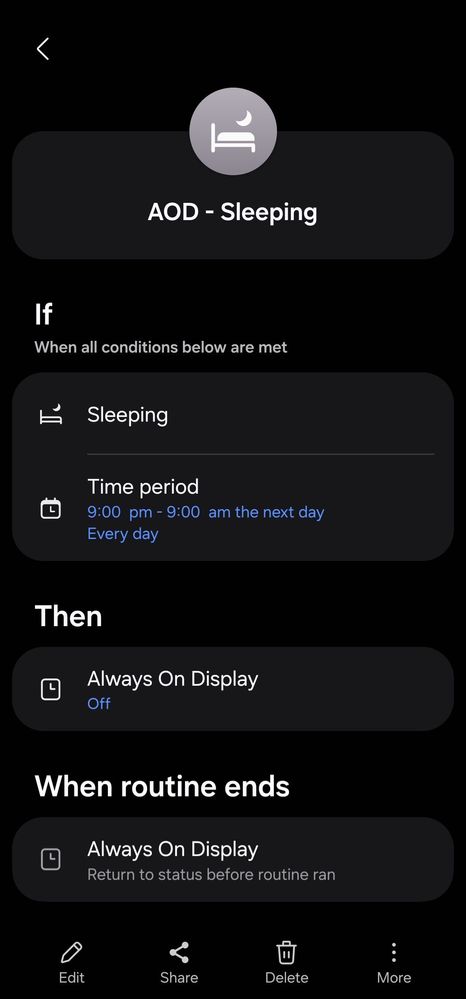
• I've created a routine "AOD - Sleeping", which should work like that:
If I'm sleeping the phone should turn off the AOD, to save battery charge. Between9pm to 9am.
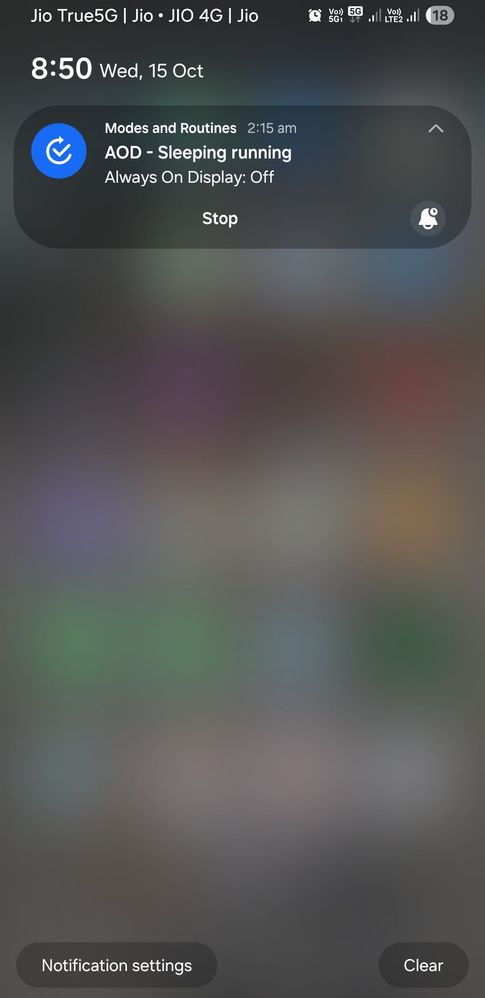
• But the issue is, I'mawake and using the phone (Playing YouTube, WhatsApp, etc apps) for more than 15 minutes, still the phone is running the "AOD - Sleeping" routine,
i.e. Even though I'm using the phone (& awake) for more than 15 minutes, the phone still thinks that I'm sleeping!
- How can I be sleeping if I'm using the phone!?
ISSUES:
1. THE PHONE DOESN'T KNOW WHEN I'M SLEEPING 😴
2. THE PHONE DOESN'T KNOW WHEN I'M NOT SLEEPING 😴
3. (OR) EVEN THOUGH THE PHONE KNOWS THAT I'M SLEEPING (/ NOT SLEEPING) , IT DOESN'T ACT PROPERLY!
Routine
Routine is running even though I'm awake & using the phone for more than 15 minutes
SOFTWARE DETAILS
One Ul version: 8.0
Android version: 16
Version: A346EXXUAEYI7 / A346EODMAEYI7 / A346EXXUAEYI7
Galaxy A34 5G
Surya230
Expert Level 5
10-15-2025 03:58 AM
in
Anonymous User
Beginner Level 1
10-15-2025 03:31 PM
in
0 likes
SataruGojoo
Expert Level 3
10-15-2025 03:33 PM
in
This routine should only run when "All conditions are met"... (See screenshot)
Condition 1: Sleeping
Condition 2: Time period
0 likes
Anonymous User
Beginner Level 1
10-15-2025 03:34 PM
in
0 likes
Arit-
Expert Level 4
10-15-2025 03:59 AM
in
SataruGojoo
Expert Level 3
10-15-2025 06:00 AM
in
0 likes
cs_member10
Moderator
10-15-2025 10:55 AM
in
Dear Samsung Member,
Greetings from Samsung Customer Support!
We request you kindly share the log file. Also, share the video clips and images for better understanding. This will help us to investigate further and resolve this issue.
To share the log file: Open Samsung Members Application > Support> Tap on send feedback> Choose Composer> Select error report> Select the appropriate issue category> Type your query and send.
Note: To ensure relevant log information is included in the error report, submit the report within 3 minutes of encountering the bug or error, and do not terminate (swipe away) the Samsung Members application until you are notified that the report has been sent. This can take up to 5 minutes.
Warm Regards,
Samsung Customer Support
0 likes
Anonymous User
Beginner Level 1
10-16-2025 10:33 AM
in
0 likes
Anonymous User
Beginner Level 1
10-17-2025 04:51 AM
in
0 likes
clandestine
Active Level 5
10-17-2025 02:30 AM
in
Like, if I upgraded to ui 8, how do i downgrade to ui 7 or anything else!
0 likes
clandestine
Active Level 5
10-17-2025 02:31 AM
in
But how?
0 likes
clandestine
Active Level 5
10-17-2025 02:34 AM
in
0 likes
SataruGojoo
Expert Level 3
10-17-2025 02:54 AM
in
But, there are some software which can install downgraded software to your phone, but that's not recommended, as they can break your phone.