
Dear Samsung Members Support Team,
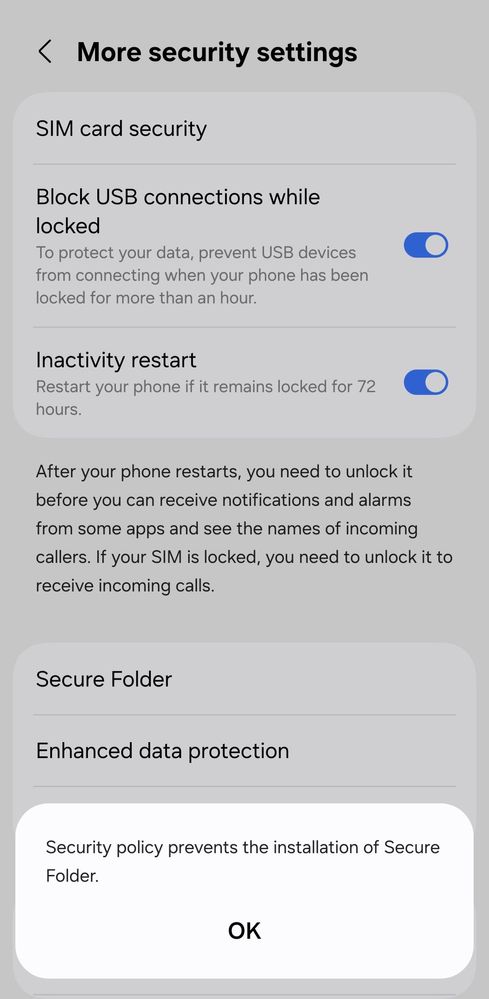
I am facing an issue with my Samsung mobile phone because the Secure Folder feature is not installed or available on my device. I have checked the settings and Galaxy Store, but I am unable to find or install the Secure Folder application.
Secure Folder is an important feature for protecting personal data, and I would like to use it on my device. I kindly request you to check this issue and help me enable or install Secure Folder on my phone as soon as possible.
Please guide me with the proper solution or steps required to resolve this problem.
Device Model: Samsung Galaxy A56
Issue: Secure Folder not installed / not available
I look forward to your support and resolution.
Thank you for your assistance.
akaur07
Beginner Level 2
04-8-2026 10:29 PM
in
Secure Folder is an important feature for protecting personal data, and I would like to use it on my device. I kindly request you to check this issue and help me enable or install Secure Folder on my phone as soon as possible.
Please guide me with the proper solution or steps required to resolve this problem. Device Model: Samsung Galaxy A56 Issue: Secure Folder not installed / not available
I look forward to your support and resolution.
Thank you for your assistance.
0 likes
cs_member10
Moderator
04-11-2026 06:03 AM
in
Dear Samsung Member,
Greetings from Samsung Customer Support!
As per your query, we would like to inform you that if you purchased your device through EMI, please complete your EMI payments before installing your secure folder.
If the issue persists, kindly report the problems with a log file. To share a log file, click on the Samsung Members Application (Open Samsung Members Application > Support> Tap on send feedback> Choose Composer> Select error report> select the appropriate issue category> Type your query and send).
Warm Regards,
Samsung Customer Support
0 likes