
Just keep any pure only white background or photo opened and swipe down to quick settings
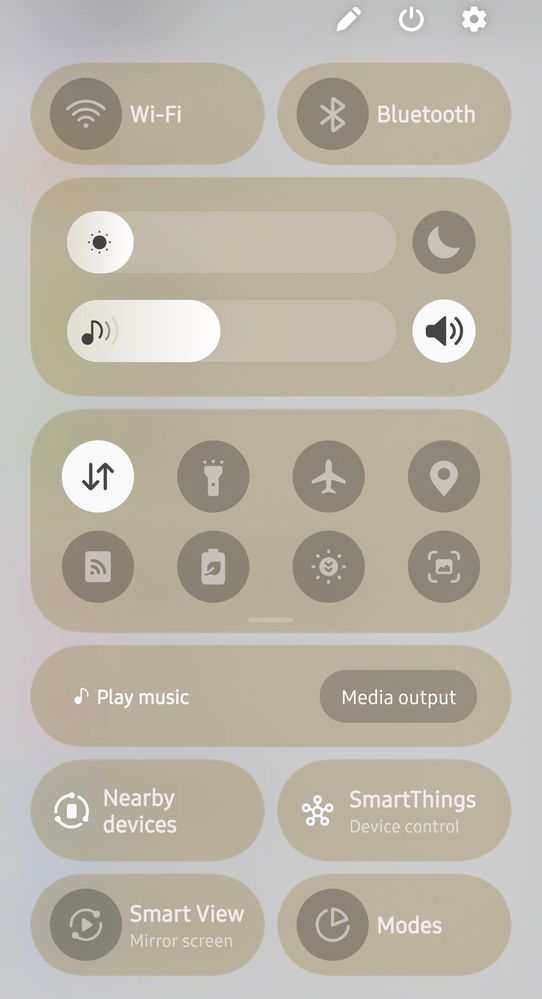
U will see worst quick setting ui ever , no recognizable icons or text or anything
Just blurrrrrrrrrrrrrr
Using any palette also not help ful as problem is not colors but poorly executed blur ui for quick panel
White mode with settings opened i background
cs_member10
Moderator
11 months ago
in
Dear Samsung Member,
Greetings from Samsung Customer Support!
We request you kindly share the log file. Also, share the video clips for better understanding. This will help us to investigate further and resolve this issue.
To share the log file: Open Samsung Members Application > Support> Tap on send feedback> Choose Composer> Select error report> Select the appropriate issue category> Type your query and send.
Note: To ensure relevant log information is included in the error report, submit the report within 3 minutes of encountering the bug or error, and do not terminate (swipe away) the Samsung Members application until you are notified that the report has been sent. This can take up to 5 minutes.
Warm Regards,
Samsung Customer Support
0 likes
malahri
Beginner Level 2
11 months ago
in
0 likes
Nebistar
Active Level 7
11 months ago
in
Dont promote this high road attitude ...
Or next day network problem arises samsung customer care will respond to not use sim in device 😂😂😂
0 likes
RahulVr
Beginner Level 2
10 months ago
in
0 likes
Nebistar
Active Level 7
10 months ago
in
Kahna kya chahte ho bhai..
0 likes