
I am not sure why one ui7 quick panel blur is very disgusting when light mode is on
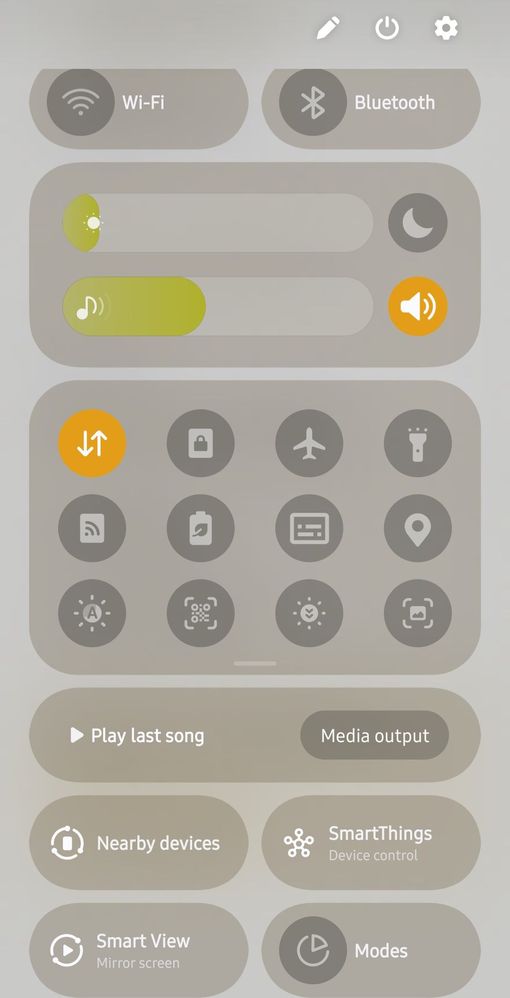
The below screenshot is taken in device light mode and background is settings app
It's very disgusting samsung has to improve and correct or make it at least standrd blur of quick panel
Also there is no blur available when u enlarge folder
Also if u put 3 rows for icons in quick panel it exceeded screen by 2 millimeter, causing double swipe to come to home screen for m15 f15 a15 devices , they should correct it aswel
Om_K
Active Level 2
06-15-2025 02:32 PM
in
0 likes
Nebistar
Active Level 7
06-15-2025 02:39 PM
in
0 likes
Anonymous User
Beginner Level 1
06-15-2025 04:40 PM
in
0 likes
Nebistar
Active Level 7
06-16-2025 04:35 AM
in
Rather than fixing issues samsung depend on customer who can ignore the issue and choose other option
My issue is not with blur, it's how poorly it's implement, u can see screenshot in white background it's very poor , samsung needs to fix this
Even low budget Chinese company don't have thse basic issues
0 likes
Anonymous User
Beginner Level 1
06-15-2025 04:40 PM
in
0 likes
cs_member10
Moderator
06-17-2025 06:17 AM
in
Dear Samsung Member,
Greetings from Samsung Customer Support!
We appreciate you taking the time to share valuable comments and taking your valuable feedback. We are continuously working to make our products better and more efficient.
Kindly share the log file regarding issues. Also, share video clips and images for better understanding. This will help us to further investigate and resolve your issue.
To share the log file: Open Samsung Members Application > Support> Tap on send feedback> Choose Composer> Select error report> select the appropriate issue category> Type your query and send.
Note: To ensure relevant log information is included in the error report, submit the report within 3 minutes of encountering the bug or error, and do not terminate (swipe away) the Samsung Members application until you are notified that the report has been sent. This can take up to 5 minutes.
Warm Regards,
Samsung Customer Support
0 likes