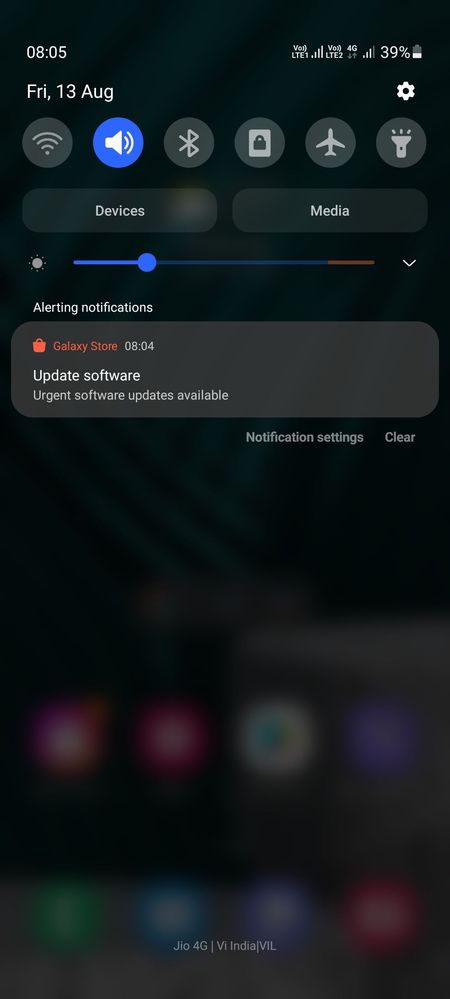
But I don't know as I didn't face any issue like this. I don't get any notification of urgent updates, that's why I'm telling. It could be a bug too, your apps are already updated. There are no updates in the update section, so I suggested to disable these notifications.
I've been to the service center day ago updated my device because of slow internet connection, it didn't fix the issue yet. I've updated my apps after restarting the device. It's just been a single day. I've restarted my device this morning and this popped up.
I've cleared the cache and data. The notification disappeared but if it pop-up again. Should I update or just leave it like that ? Because it doesn't brief anything about the update.
I've cleared the cache and data. The notification disappeared but if it pop-up again. Should I update or just leave it like that ? Because it doesn't brief anything about the update.

Thangarajgg
Beginner Level 2
5 years ago
in
0 likes
Anonymous User
Beginner Level 1
5 years ago
in
0 likes
Anonymous User
Beginner Level 1
5 years ago
in
0 likes
GiiRafFee
Active Level 8
5 years ago
in
0 likes
Anonymous User
Beginner Level 1
5 years ago
in
0 likes
Anonymous User
Beginner Level 1
5 years ago
in
0 likes
Anonymous User
Beginner Level 1
5 years ago
in
0 likes
GiiRafFee
Active Level 8
5 years ago
in
Why is it asking to urgent update
Anonymous User
Beginner Level 1
5 years ago
in
0 likes
DarshanChatterjee
Expert Level 5
5 years ago
in
0 likes
GiiRafFee
Active Level 8
5 years ago
in
0 likes
DarshanChatterjee
Expert Level 5
5 years ago
in
0 likes
GiiRafFee
Active Level 8
5 years ago
in
The notification disappeared but if it pop-up again.
Should I update or just leave it like that ?
Because it doesn't brief anything about the update.
0 likes
Vicky_A52
Expert Level 5
5 years ago
in
0 likes
GiiRafFee
Active Level 8
5 years ago
in
The notification disappeared but if it pop-up again.
Should I update or just leave it like that ?
Because it doesn't brief anything about the update.
0 likes