
Samsung You Must Provide The Downloads Tab In The Samsung Internet Browser .
It Will Be Easy For Us To Move To Downloads.
I Have Put A Gile For Downloading Then When It Is Downloaded . Then I Have Cleared The File Downloaded Notification. But After That I Am Unable To Move To The Downloads Tab .
I Had To Put One Download Again And The I Have To Click On That File Then I Will Be Able To Move To The Downloads Tab.
Or I Have To Search That File In My Files. It Will Be A Lot Of Wastage Of Time .
See In The Picture
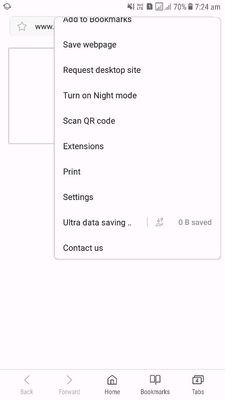
1. See There Is No Downloads Tab In The Menu Bar.
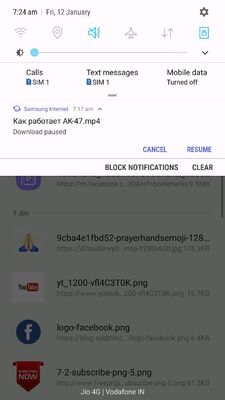
2. I Have Put One File For Download .
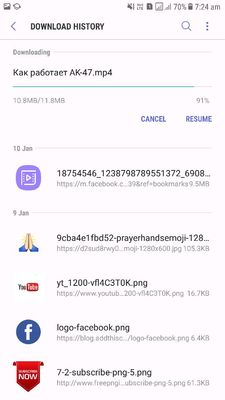
3. I Have To Touch On That Download Notification Yhen I will Move To The Downloads Tab .
So Samsung Please Provide The Downloads Tab Option In Samsung Browser .
It Will Be Easy For Us To Move To Downloads.
I Have Put A Gile For Downloading Then When It Is Downloaded . Then I Have Cleared The File Downloaded Notification. But After That I Am Unable To Move To The Downloads Tab .
I Had To Put One Download Again And The I Have To Click On That File Then I Will Be Able To Move To The Downloads Tab.
Or I Have To Search That File In My Files. It Will Be A Lot Of Wastage Of Time .
See In The Picture
1. See There Is No Downloads Tab In The Menu Bar.
2. I Have Put One File For Download .
3. I Have To Touch On That Download Notification Yhen I will Move To The Downloads Tab .
So Samsung Please Provide The Downloads Tab Option In Samsung Browser .
admin_
Expert Level 5
9 years ago
in