Kindly turn off Auto Scan App Protection permission then try to it's again. If you like please accept as a solution it's help to others users also ,click on 3dots in my reply section and click on accept solution. Thanks.
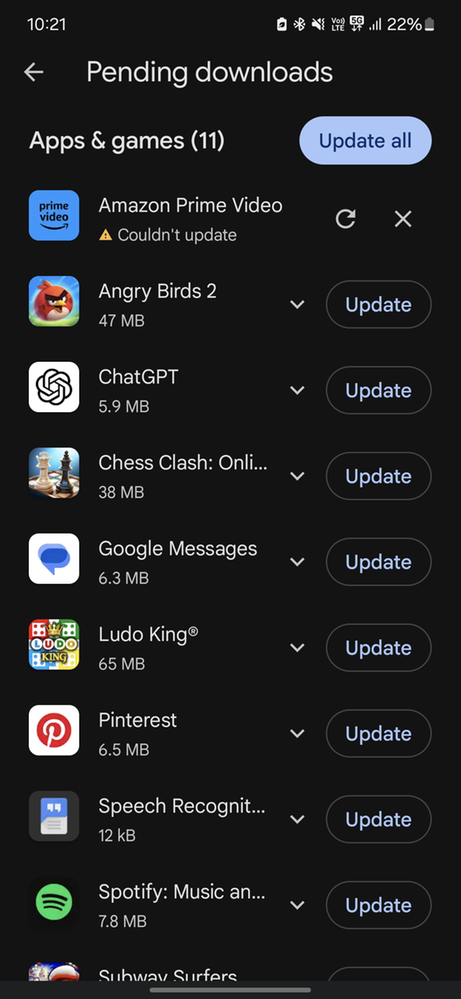
Given that you've already tried restarting your phone and clearing the Play Store cache, here are some additional steps to help resolve the issue:
*Additional Troubleshooting Steps*
1. *Clear Play Store Data*
1. Go to *Settings* > *Apps* > *Play Store*. 2. Tap *Storage* > *Clear data*.
2. *Check Storage Space*
Ensure your device has sufficient storage space to update apps. Check your device's storage by going to *Settings* > *Storage*.
3. *Disable VPN or Proxy*
If you're using a VPN or proxy, try disabling it and then attempt to update the apps.
4. *Check App Permissions*
Ensure that the Play Store has the necessary permissions to update apps. Go to *Settings* > *Apps* > *Play Store* > *Permissions*.
5. *Reinstall Play Store Updates*
1. Go to *Settings* > *Apps* > *Play Store*. 2. Tap *Three-dot menu* > *Uninstall updates*. 3. Wait for the updates to be uninstalled, then restart your device.
6. *Check for System Updates*
Ensure your device is running the latest software. Go to *Settings* > *Software update* > *Download and install*.
7. *Reset Google Play Services*
1. Go to *Settings* > *Apps* > *Google Play Services*. 2. Tap *Force stop*, then *Clear cache* and *Clear data*.
If none of these steps resolve the issue, consider:
*Advanced Troubleshooting*
1. *Clear Google Play Services Data*
1. Go to *Settings* > *Apps* > *Google Play Services*. 2. Tap *Storage* > *Clear data*. 3. Disable auto blocker.
2. *Perform a Factory Reset*
If all else fails, consider performing a factory reset. Back up your important data and settings before proceeding.
If you're still experiencing issues after trying these steps, it's possible that there's a more complex problem with your device or the Play Store. In this case, consider:
*Seeking Further Assistance*
1. *Contact Google Play Support*
Reach out to Google Play Support for further assistance.
2. *Visit a Samsung Authorized Service Center*
Take your device to a Samsung authorized service center for professional diagnosis and repair.
If this reply answered your query please mark my reply as "resolved" by clicking 3 vertical dots on top right of my reply. Thank you 😊

Selected Answer
DINKAR_A34_5G
Expert Level 5
12-10-2024 07:27 AM
in
https://play.google.com/store/apps/details?id=com.google.android.gms
0 likes
Ňoise
Active Level 6
12-10-2024 04:56 AM
in
Ishaan_A55
Active Level 8
12-10-2024 06:41 AM
in
0 likes
Ňoise
Active Level 6
12-10-2024 06:42 AM
in
0 likes
goodthings
Expert Level 5
12-10-2024 04:58 AM
in
0 likes
Ňoise
Active Level 6
12-10-2024 05:02 AM
in
0 likes
Ishaan_A55
Active Level 8
12-10-2024 06:42 AM
in
goodthings
Expert Level 5
12-10-2024 09:41 AM
in
Kaushik1905
Active Level 3
12-10-2024 05:15 AM
in
After updating here, all will be fine.
0 likes
Ishaan_A55
Active Level 8
12-10-2024 06:43 AM
in
0 likes
Kaushik1905
Active Level 3
12-10-2024 06:49 AM
in
0 likes
DeepakSinghania
Active Level 7
12-10-2024 05:22 AM
in
0 likes
Ishaan_A55
Active Level 8
12-10-2024 06:44 AM
in
0 likes
DINKAR_A34_5G
Expert Level 5
12-10-2024 05:24 AM
in
If you found this answer helpful, then tap "Accept Solution" by clicking the three dots on the top right of this comment.
0 likes
DINKAR_A34_5G
Expert Level 5
12-10-2024 08:23 AM
in
0 likes
Ishaan_A55
Active Level 8
12-10-2024 10:58 AM
in
DINKAR_A34_5G
Expert Level 5
12-10-2024 10:59 AM
in
0 likes
Vaibhav6321
Active Level 1
12-10-2024 05:25 AM
in
0 likes
AudioJack35
Active Level 10
12-10-2024 05:36 AM
in
0 likes
Wodehouse
Expert Level 5
12-10-2024 05:47 AM
in
Given that you've already tried restarting your phone and clearing the Play Store cache, here are some additional steps to help resolve the issue:
*Additional Troubleshooting Steps*
1. *Clear Play Store Data*
1. Go to *Settings* > *Apps* > *Play Store*.
2. Tap *Storage* > *Clear data*.
2. *Check Storage Space*
Ensure your device has sufficient storage space to update apps. Check your device's storage by going to *Settings* > *Storage*.
3. *Disable VPN or Proxy*
If you're using a VPN or proxy, try disabling it and then attempt to update the apps.
4. *Check App Permissions*
Ensure that the Play Store has the necessary permissions to update apps. Go to *Settings* > *Apps* > *Play Store* > *Permissions*.
5. *Reinstall Play Store Updates*
1. Go to *Settings* > *Apps* > *Play Store*.
2. Tap *Three-dot menu* > *Uninstall updates*.
3. Wait for the updates to be uninstalled, then restart your device.
6. *Check for System Updates*
Ensure your device is running the latest software. Go to *Settings* > *Software update* > *Download and install*.
7. *Reset Google Play Services*
1. Go to *Settings* > *Apps* > *Google Play Services*.
2. Tap *Force stop*, then *Clear cache* and *Clear data*.
If none of these steps resolve the issue, consider:
*Advanced Troubleshooting*
1. *Clear Google Play Services Data*
1. Go to *Settings* > *Apps* > *Google Play Services*.
2. Tap *Storage* > *Clear data*.
3. Disable auto blocker.
2. *Perform a Factory Reset*
If all else fails, consider performing a factory reset. Back up your important data and settings before proceeding.
If you're still experiencing issues after trying these steps, it's possible that there's a more complex problem with your device or the Play Store. In this case, consider:
*Seeking Further Assistance*
1. *Contact Google Play Support*
Reach out to Google Play Support for further assistance.
2. *Visit a Samsung Authorized Service Center*
Take your device to a Samsung authorized service center for professional diagnosis and repair.
If this reply answered your query please mark my reply as "resolved" by clicking 3 vertical dots on top right of my reply. Thank you 😊
Ishaan_A55
Active Level 8
12-10-2024 07:00 AM
in
0 likes
Wodehouse
Expert Level 5
12-10-2024 08:41 AM
in
0 likes