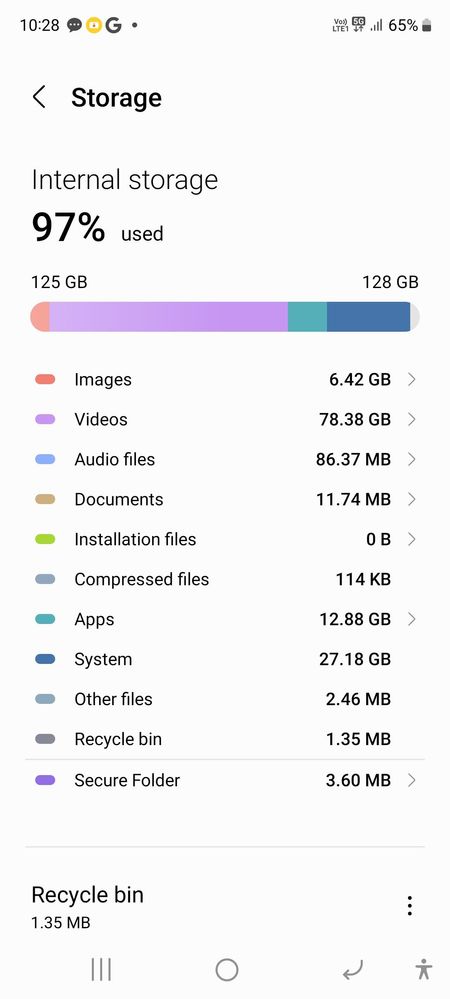
The 27 GB is already occupied by system,so you gets less storage than128.You can use a SD card to expand storage. And clearing cache doesn't give you more storage but just little bit of it.
The basis for your issue regarding the storage, we want to inform you that you can clear the internal storage of the device, kindly follow the given steps to clear the storage.
Empty recycle bin
Settings > Battery and device care > Storage. If there are items in your Recycle bin, you will see app icons under the Recycle bin header. Tap on the icon you would like to empty files from. Tap Empty. If you don't see this, try tapping on the Menu icon (three dots) at the top right to find it. You can also press and hold on one file, and select the files you want to delete instead of deleting all of them.
Uninstall unused apps Settings > Battery and device care > Storage. If you have any unused apps, they should appear under the Unused Apps header. Tap Unused apps. Select the apps you wish to uninstall and tap Uninstall.
Delete duplicate files
Settings > Battery and device care > Storage. If you have duplicate files, they will appear below the header of the Duplicate file. Tap Duplicate files. Select the file you wish you delete and tap Delete.
Delete large files
Settings > Battery and device care > Storage. If you have large files on your phone, they should appear under the Large files header. Tap Large files. Select the files you wish to delete and tap Delete.
You can also use the SD card to expand your device storage.

Haridhvar23
Active Level 7
3 years ago
in
0 likes
Devv_007
Expert Level 5
3 years ago
in
And clearing cache doesn't give you more storage but just little bit of it.
0 likes
jayamfame
Active Level 7
3 years ago
in
0 likes
cs_member8
Moderator
3 years ago
in
Dear Samsung Member,
Greetings from Samsung Customer Support!
The basis for your issue regarding the storage, we want to inform you that you can clear the internal storage of the device, kindly follow the given steps to clear the storage.
Empty recycle bin
Settings > Battery and device care > Storage.
If there are items in your Recycle bin, you will see app icons under the Recycle bin header. Tap on the icon you would like to empty files from.
Tap Empty. If you don't see this, try tapping on the Menu icon (three dots) at the top right to find it.
You can also press and hold on one file, and select the files you want to delete instead of deleting all of them.
Uninstall unused apps
Settings > Battery and device care > Storage.
If you have any unused apps, they should appear under the Unused Apps header. Tap Unused apps.
Select the apps you wish to uninstall and tap Uninstall.
Delete duplicate files
Settings > Battery and device care > Storage.
If you have duplicate files, they will appear below the header of the Duplicate file. Tap Duplicate files.
Select the file you wish you delete and tap Delete.
Delete large files
Settings > Battery and device care > Storage.
If you have large files on your phone, they should appear under the Large files header. Tap Large files.
Select the files you wish to delete and tap Delete.
You can also use the SD card to expand your device storage.
Thank you for writing to Samsung.
Warm Regards,
Samsung Customer Support
0 likes