
Google Assistant Redesign Brings Along New Compact Interface
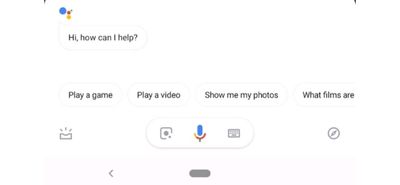
Google Assistant helps you perform a number of tasKs that too with a ton of ease, and the company is making them easier to use. Well, Google had been testing a new redesign for the Al voice assistant on your smartphone for quite some time and it's finally rolling out.
The new Google Assistant Ul now has a compact and rounded feel. The Ul places all the primary buttons including the Google Lens, Google Assistant, and keyboard, in an elongated pill at the center.
You have the feed on the left, which is also accessible by swiping up on the Google Assistant pop-up, and the Explore section on the right. Long-press the home button on your Android device to see the new interface
No replies and comments found