
Must Do the following improvements in the very next update-
1. Increase the size of quick setting toggles in notification pannel ; reduce the numbet of toggles- 3 in a row, or give it as option to chose in customization sett for notification pannel.
2. Instead of under the status bar, Place the power off button, n three dot option below the time n date in quick settings panel n increase the size of buttons too.
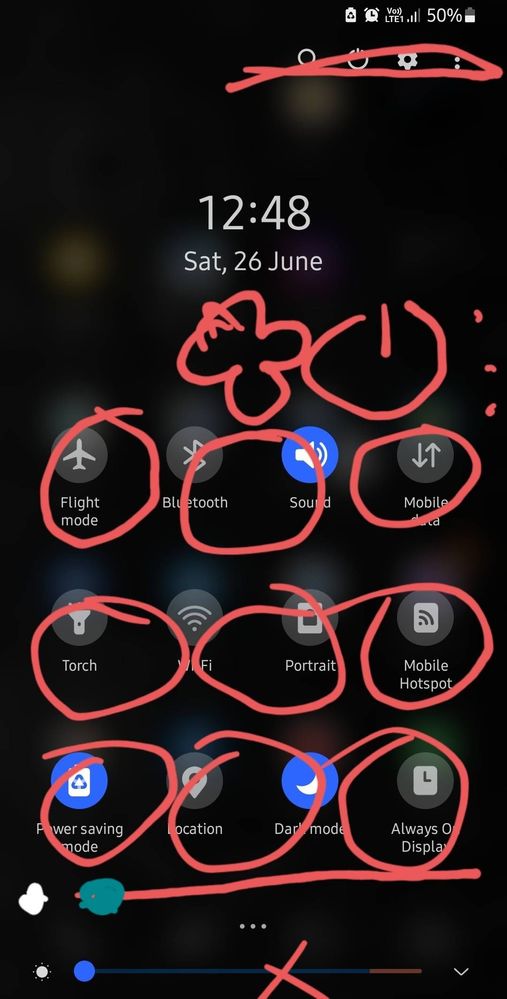
3. Must Add "show data usage n internet speed in notifications
Chaman17
Active Level 8
06-27-2021 07:18 PM
in
Although not sure about 2 & 3; but for 1, you can increase the number of toggles using setedit app by changing specific values. It's somewhat complex to do.
0 likes
SamsA50s
Active Level 5
06-27-2021 07:30 PM
in
0 likes
Hasan178
Active Level 6
06-27-2021 08:02 PM
in
0 likes
SamsA50s
Active Level 5
06-28-2021 01:24 AM
in
0 likes
Hasan178
Active Level 6
06-28-2021 06:02 AM
in
0 likes
MrDragone
Active Level 9
06-27-2021 08:07 PM
in
0 likes
SamsA50s
Active Level 5
06-4-2022 02:01 PM
in
0 likes
SamsA50s
Active Level 5
06-4-2022 02:02 PM
in
0 likes