
title:
Wallpaper lock screen clock issue
(Post creation time:
11-14-2026 03:07 AM
)
47 Views
M
Members_i7PnnC1
Active Level 1
I am facing an issue with the lock screen wallpaper on my Samsung phone. Whenever I set an image as my wallpaper, the lock screen clock becomes stretched vertically and appears unusually elongated, as shown in the attached screenshots. However, when I zoom in on the wallpaper image, the clock automatically returns to its normal proportions. This issue occurs when setting different images as wallpapers, not just with a particular image. Please investigate this issue and provide a permanent fix, as the clock should maintain its normal appearance regardless of the wallpaper's zoom level or image size.
Related Content
screen lock wallpaper issue
. Others 10-10-2020 08:14 PM
Lock screen clock issue
. Galaxy S 11-3-2023 08:57 AM
Lock screen clock issue
. Galaxy S 09-8-2025 07:12 AM
Adaptive lock screen clock font based on wallpaper not available on my s26 ultra
. Galaxy S 03-20-2026 06:24 AM
samsung galaxy a51 lock screen wallpaper issue
. Galaxy A 06-17-2020 12:58 AM
Medquix
Active Level 5
11-14-2026 03:16 AM
in
Where is your screenshot of the issue you faced in your Samsung Mobile?
0 likes
Members_i7PnnC1
Active Level 1
11-14-2026 03:23 AM
in
Here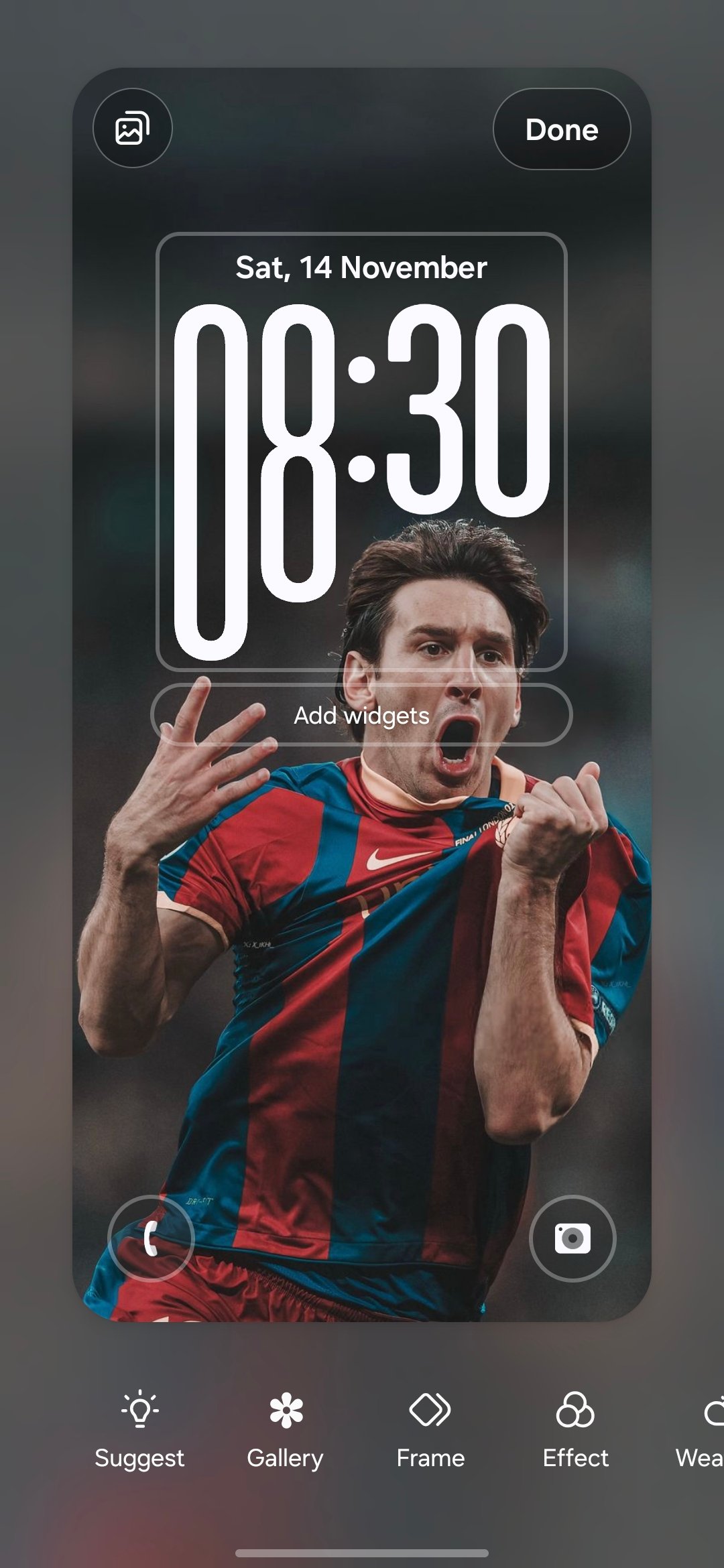
0 likes
Medquix
Active Level 5
11-14-2026 03:37 AM
in
It's an adaptive clock style , it changes it's style and adjust on its own according to the wallpaper you have applied. As the head is below it is enlarged and elongated to adjust according to the wallpaper. There is no issue with the clock . Please mark this as a solution.
0 likes
Members_i7PnnC1
Active Level 1
11-14-2026 03:42 AM
in
This isn't solution 😕
0 likes
Medquix
Active Level 5
11-14-2026 03:49 AM
in
Change the adaptive clock style font
0 likes