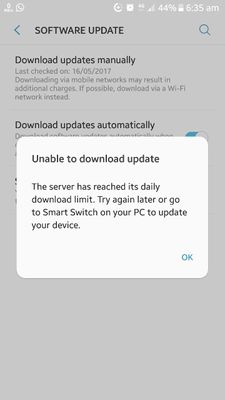
Thanks for being with Samsung and for sharing your concern. Kindly check given below procedure for updating device through Samsung Smart Switch at Home.
Requirements:- • High speed internet connection (minimum 2 MBPS) • Handset’s battery should be fully charged. • Continuous Power backup (in case of power failure, handset might be crashed) Step 1 Install the updated version of Samsung Smart Switch in your PC/Laptop. The same can be downloaded from the link given below- http://www.samsung.com/in/support/smartswitch/ Step 2 After installation of smart switch on PC/Laptop, connect your handset via USB cable with PC/Laptop. Step 3 Notification will appear in Samsung smart switch window if the updates are available for respective devices. Points to remember:- 1. Do not disconnect the handset during firmware updation. 2. Please ensure that power supply and internet connection don’t get interrupted. 3. This process might take 30 – 45 minutes approximately depending upon the internet speed.

RAiiNote20Ultra5G
Active Level 10
05-16-2017 02:00 AM
in
0 likes
doc
Active Level 6
05-16-2017 03:15 AM
in
0 likes
admin_
Expert Level 5
05-18-2017 09:17 AM
in
Requirements:-
• High speed internet connection (minimum 2 MBPS)
• Handset’s battery should be fully charged.
• Continuous Power backup (in case of power failure, handset might be crashed)
Step 1
Install the updated version of Samsung Smart Switch in your PC/Laptop. The same can be downloaded from the link given below-
http://www.samsung.com/in/support/smartswitch/
Step 2
After installation of smart switch on PC/Laptop, connect your handset via USB cable with PC/Laptop.
Step 3
Notification will appear in Samsung smart switch window if the updates are available for respective devices.
Points to remember:-
1. Do not disconnect the handset during firmware updation.
2. Please ensure that power supply and internet connection don’t get interrupted.
3. This process might take 30 – 45 minutes approximately depending upon the internet speed.
0 likes