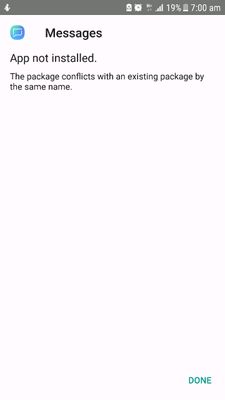
most of the time I get this error while installing apps from APK mirror. is there any specific setting i have to make for smooth installation? Please help me guys.
in case of some apps ... such as sms, call & sms blacklist (firewall app), dialer, radio, Samsung system manager etc... not possible without mod, tweak or root
Currently there are only 2 options: 1. Check whether you have any software update. Like Monthly security update. If yes, then install the update and try the apk installation. It will work.
2. Factory reset your phone, then at the first boot, install the apks.
Thanks for being with Samsung and sharing your concern. We would request you to install the application from Play Store or Galaxy App as we do not recommend installing application from any other source. If the issue still persists, we would request you to provide logs/video within 15 minutes of issue occurrence by registering this feedback in Error Section (Samsung Members App -> Feedback -> Questions/Errors -> Create -> Error reports) so that your concern can be resolved soon. Be sure to hit ♡ when you find an answer that works for you. For Further assistance, you can get in touch with us via Live Chat option by following- http://livechat.support.samsung.com/Customer_new/IN. You can also connect us via Samsung Members web community by following mentioned url-https://community.samsungmembers.com/en_IN#/

SandeepDdn
Active Level 9
03-8-2018 01:53 AM
in
0 likes
Amol
Active Level 1
03-8-2018 02:59 AM
in
0 likes
SandeepDdn
Active Level 9
03-8-2018 03:24 AM
in
0 likes
pratikswain
Active Level 9
03-8-2018 02:21 AM
in
0 likes
Vishnu_Pv
Active Level 7
03-8-2018 03:04 AM
in
1. Check whether you have any software update. Like Monthly security update. If yes, then install the update and try the apk installation. It will work.
2. Factory reset your phone, then at the first boot, install the apks.
Amol
Active Level 1
03-8-2018 04:14 AM
in
0 likes
ம_ர_க_
Active Level 3
03-8-2018 04:22 AM
in
0 likes
admin_
Expert Level 5
03-8-2018 08:55 AM
in
For Further assistance, you can get in touch with us via Live Chat option by following- http://livechat.support.samsung.com/Customer_new/IN. You can also connect us via Samsung Members web community by following mentioned url-https://community.samsungmembers.com/en_IN#/
0 likes