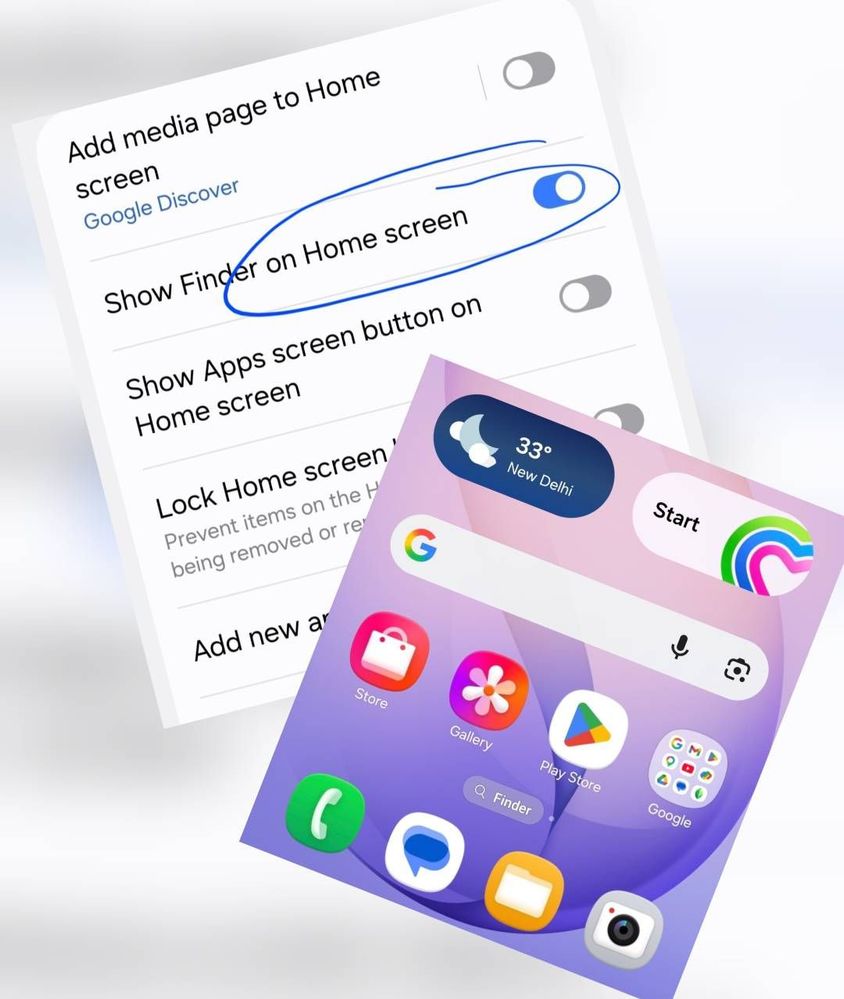
As per your query, the concept has changed to allow customers to control whether the Finder icon is displayed on the Home screen (menu added with default setting: OFF). If the One UI Home app is updated while using the phone, the Finder icon will disappear, and a new option 'Show Finder on Home screen' will be added in the Home screen settings (default setting: OFF). Additionally, the Finder item in the Edge panel will also disappear. If you want to display the Finder icon on the Home screen, you can enable it in the settings.
Path: Settings > Home screen > Enable 'Show Finder on Home screen' option
Note: Even if you set ‘Show Finder on Home screen’ to ON, the icon and selection option will not appear in the Edge panel.

Tasuku
Active Level 8
6 months ago
in
Kuldeep_Rvl
Expert Level 5
6 months ago
in
0 likes
Tasuku
Active Level 8
6 months ago
in
Kuldeep_Rvl
Expert Level 5
6 months ago
in
0 likes
cs_member10
Moderator
6 months ago
in
Dear Samsung Member,
Greetings from Samsung Customer Support!
As per your query, the concept has changed to allow customers to control whether the Finder icon is displayed on the Home screen (menu added with default setting: OFF). If the One UI Home app is updated while using the phone, the Finder icon will disappear, and a new option 'Show Finder on Home screen' will be added in the Home screen settings (default setting: OFF). Additionally, the Finder item in the Edge panel will also disappear. If you want to display the Finder icon on the Home screen, you can enable it in the settings.
Path: Settings > Home screen > Enable 'Show Finder on Home screen' option
Note: Even if you set ‘Show Finder on Home screen’ to ON, the icon and selection option will not appear in the Edge panel.
Warm Regards,
Samsung Customer Support
0 likes
Kuldeep_Rvl
Expert Level 5
6 months ago
in
0 likes