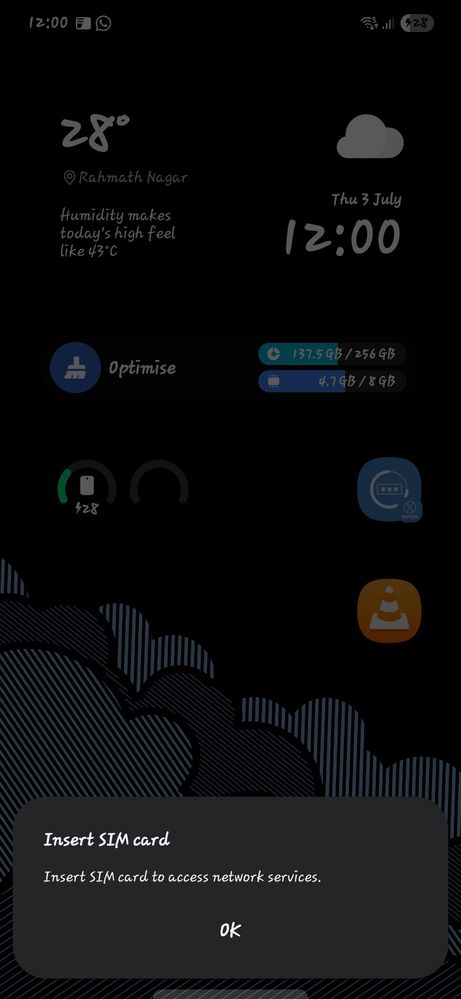
After the latest update on my S23. Whenever I turned off my mobile data and again turned it on it shows please insert sim card to access internet connections. Please resolve this issue as soon as possible or suggest any methods to resolve on my own.
If the issue persists, kindly report the problems with a log file. To share a log file, click on the Samsung Members Application (Open Samsung Members Application > Support> Tap on send feedback> Choose Composer> Select error report> Select the appropriate issue category> Type your query and send).

Aditya202
Beginner Level 3
1 year ago
in
0 likes
rahul10115
Active Level 1
1 year ago
in
0 likes
MuhammadAbbaas
Active Level 1
1 year ago
in
0 likes
rahul10115
Active Level 1
1 year ago
in
0 likes
MuhammadAbbaas
Active Level 1
1 year ago
in
0 likes
SATYA35
Expert Level 5
1 year ago
in
0 likes
Fzs001
Active Level 5
1 year ago
in
0 likes
MuhammadAbbaas
Active Level 1
1 year ago
in
cs_member10
Moderator
1 year ago
in
Dear Samsung Member,
Greetings from Samsung Customer Support!
We regret to hear about your experience with our product. Please believe that this is not a usual occurrence.
Please perform the below-mentioned troubleshooting steps, these may help in resolving your concerns.
● Galaxy device internet issue: https://www.samsung.com/in/support/mobile-devices/how-to-troubleshoot-mobile-data-issues/
● Galaxy device network issue: https://www.samsung.com/in/support/mobile-devices/samsung-galaxy-smartphone-how-to-optimise-network-connectivity/
If the issue persists, kindly report the problems with a log file. To share a log file, click on the Samsung Members Application (Open Samsung Members Application > Support> Tap on send feedback> Choose Composer> Select error report> Select the appropriate issue category> Type your query and send).
Warm Regards,
Samsung Customer Support
0 likes