title:

Notification app icon

(Post creation time:  

10-25-2022 08:37 AM

)

3124 Views

S

SaiSri007

Active Level 1

last edited


10-25-2022 08:37 AM


in

 
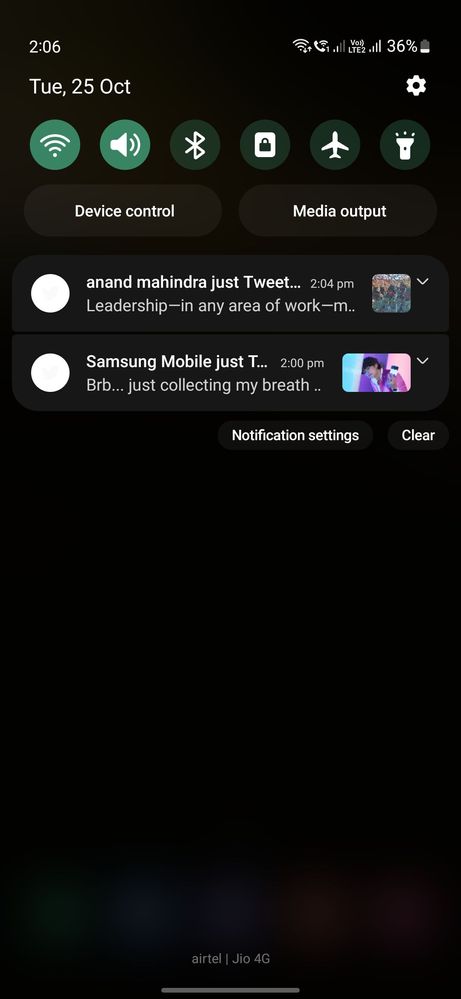
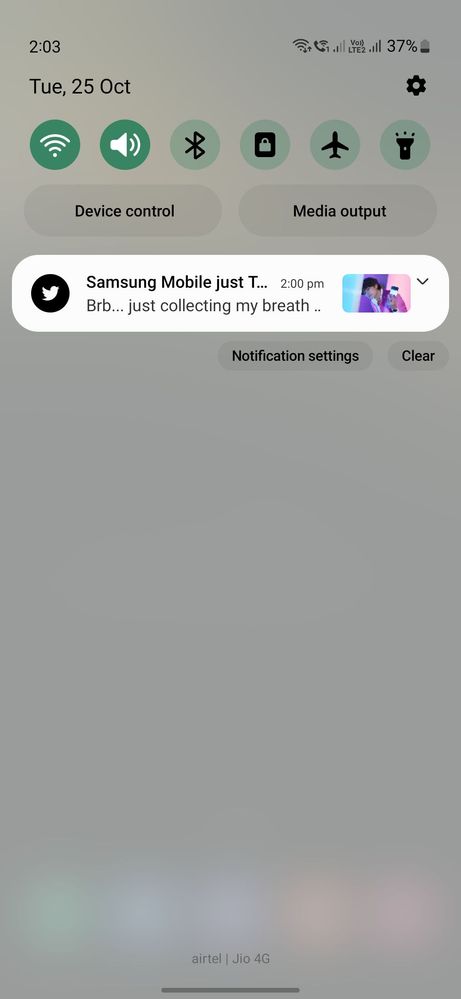
Hi, I cant able to change this notification icon from black and white to color, if I moved from white theme to dark theme I cant able to see the app icon in notification please help to change this 
image


image


#s22plus,#notifications
    • S

      SaiSri007

      Active Level 1

      10-25-2022 08:43 AM


      in

       
      Is there any solution for this ?

      0 likes

    • S

      Sidhabhi

      ★★

      10-25-2022 09:43 AM


      in

       
      Change to default theme and color palette..give a try
    • S

      SaiSri007

      Active Level 1

      10-25-2022 10:10 AM


      in

       
      Tried that too still no use

      0 likes

    • T

      10-25-2022 10:25 AM


      in

       
      Default theme use karo sahi ho jaayega
    • S

      SaiSri007

      Active Level 1

      10-25-2022 11:00 AM


      in

       
      I'm using default theme pack only I reseted all the settings also still it showing this this

      0 likes

      I

      itsHRSH

      Active Level 7

      10-25-2022 11:34 AM


      in

       
      Turn off COLOR PALETTE. Use the blue one that comes by default!Screenshot_20221025_170400_1000001384_1666697640.jpg
    • S

      SaiSri007

      Active Level 1

      10-25-2022 12:05 PM


      in

       
      Thankyou guys, actually my color pallet is off then I check my Good Lock quick panel is over write the pallet so it showing like that no I change the good lock then it worked fine 😊 thanks to everyone support @itsHRSH @techiepradhumn, @sidhabhi, @
      P

      pratikkhalane

      Beginner Level 2

      11-5-2022 07:40 PM


      in

       
      Can you explain the steps? i am also facing the same issue

      0 likes

      S

      SaiSri007

      Active Level 1

      11-6-2022 02:39 AM


      in

       
      Just open good lock in that go to theme park in that open quickpanel, select the theme which is appiled in that and select unapply it will be back to normal again
      P

      pratikkhalane

      Beginner Level 2

      11-6-2022 08:57 AM


      in

       
      I did that , but i wanted my theme to be working and not the default one!!! It seems they have messed up the UI part

      0 likes

    • C

      cs_member8

      Moderator

      11-2-2022 12:34 AM


      in


      Dear Samsung Member,

      Greetings from Samsung Customer Support!

      We acknowledge your query and apologize for the inconvenience caused to you and will surely assist you regarding the same. We would request you to register your concern in Samsung Members Application. So, our concern team gets back to you as soon as possible.

      Please follow this path to register your concern in Samsung Members Application (Open Samsung Members Application > Get help > Send Feedback > Error report).

      Note. please attach the error log file within 15 minutes of the error occurring.

      Thank you for writing to Samsung.

      Warm Regards,
      Samsung Customer Support

      0 likes

    Related Content

    Notification icon

    Notification icon