All community
Sign In/Register
/
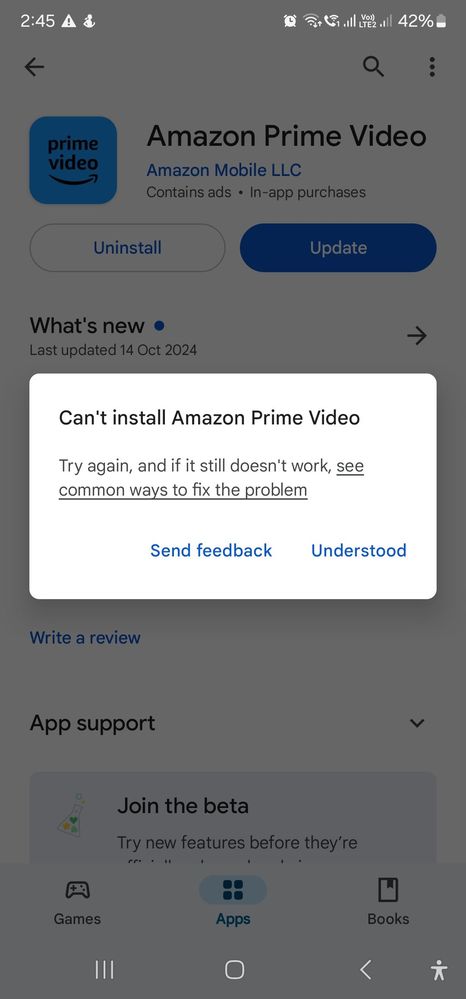
Not able to install or update apps
(Post creation time:
2 years ago
)
2696 Views
samsungloveboy
Active Level 3
last edited
in
1 like
21 Comments
Selected Answer
Ashishkharade
Active Level 4
5 likes
TanishqAnand
0 likes
Shekhar_Pandey
Expert Level 1
CLAŴ
Active Level 6
habil44
Active Level 1
Wodehouse
Expert Level 5
Load 5 older answers
Not able to install apps
. Galaxy S 5 years ago
Not able to update or install apps from playstore in Samsung S21 Plus
. Galaxy Store (Apps & more) 5 years ago
Not able to update or install new apps from Play store after Google AI UPDATE
. Galaxy S 2 years ago
Andriod 12 oneui not able to install apps
. Galaxy A 5 years ago
Unable to install or update some apps
. Others 5 years ago

Selected Answer
Ashishkharade
Active Level 4
2 years ago
in
samsungloveboy
Active Level 3
2 years ago
in
TanishqAnand
Active Level 4
2 years ago
in
0 likes
samsungloveboy
Active Level 3
2 years ago
in
0 likes
Shekhar_Pandey
Expert Level 1
2 years ago
in
0 likes
samsungloveboy
Active Level 3
2 years ago
in
0 likes
CLAŴ
Active Level 6
2 years ago
in
And clear data playstore
0 likes
samsungloveboy
Active Level 3
2 years ago
in
0 likes
CLAŴ
Active Level 6
2 years ago
in
0 likes
habil44
Active Level 1
2 years ago
in
0 likes
samsungloveboy
Active Level 3
2 years ago
in
0 likes
Wodehouse
Expert Level 5
2 years ago
in
Then scroll down to "Change system settings" to allowed.
Restart phone and try.
If my suggestion worked mark my reply as solved. Thank you.
0 likes
samsungloveboy
Active Level 3
2 years ago
in
0 likes
Wodehouse
Expert Level 5
2 years ago
in
0 likes
samsungloveboy
Active Level 3
2 years ago
in
0 likes
Wodehouse
Expert Level 5
2 years ago
in
0 likes