
title:

Network issues after one ui 7 update

(Post creation time:  

04-25-2025 12:07 PM

)

2049 Views

A

aboutzahurul

Active Level 3

last edited


04-25-2025 12:07 PM


in

 
Following the One UI 7 update, 
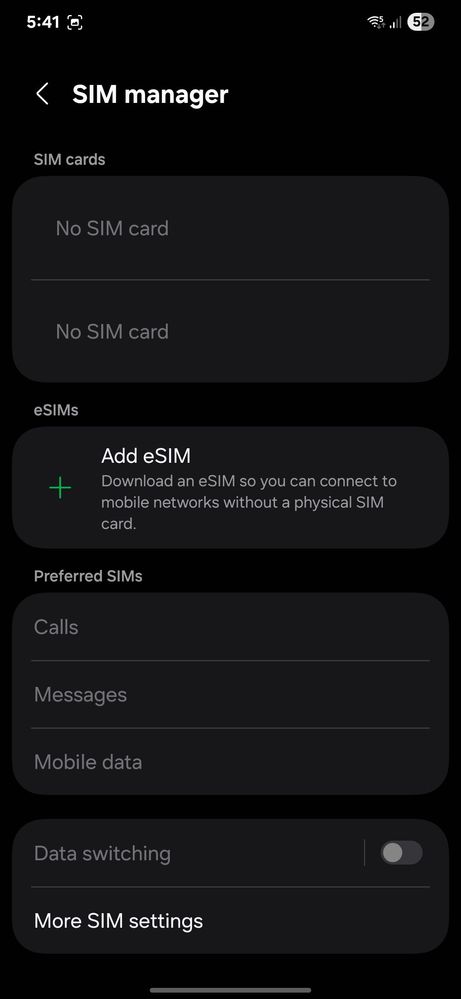
the device displays full network signal strength; however, call functionality is not working. Incoming calls report the number as unreachable. A device restart provides a temporary solution. 
Additionally, network signal bars remain visible even with all SIM cards removed. Is this the expected behavior? Have other users experienced similar problems?

image


  • S

    souvik22ff

    Active Level 9

    04-25-2025 12:21 PM


    in

     
    When remove sim card samsung showing **bleep** signal bar all devices

    0 likes

    A

    aboutzahurul

    Active Level 3

    04-25-2025 12:28 PM


    in

     
    Didn't know about it

    0 likes

  • S

    souvik22ff

    Active Level 9

    04-25-2025 12:22 PM


    in

     
    F ake signa bar

    0 likes

    A

    aboutzahurul

    Active Level 3

    04-25-2025 12:29 PM


    in

     
    I just took screenshot directly from my phone.

    0 likes

    A

    aboutzahurul

    Active Level 3

    04-25-2025 12:31 PM


    in

     
    This all screenshot i took same time.1745584246834.jpg1745584246847.jpg1745584246869.jpg

    0 likes

  • N

    naviaz

    Expert Level 2

    04-25-2025 12:31 PM


    in

     
    Phone will show signal but it's not registered without a sim.

    0 likes

    A

    aboutzahurul

    Active Level 3

    04-25-2025 12:33 PM


    in

     
    OK, this didn't notice before.

    0 likes

  • S

    sharafscs

    Active Level 3

    04-25-2025 12:34 PM


    in

     
    Reset mobile network settings

    And reboot 1745584421468.jpg

    0 likes

    A

    aboutzahurul

    Active Level 3

    04-25-2025 12:39 PM


    in

     
    Ok, let me check if that resolves the issues.

    0 likes

  • G

    goodthings

    Expert Level 5

    04-25-2025 03:34 PM


    in

     
    It's a major update. Kindly reset factory data with backup then try to it's again. If you like please accept as a solution it's help to others users also, click on 3dots in my reply section and click on accept solution. Thanks.

    0 likes

    A

    aboutzahurul

    Active Level 3

    04-25-2025 04:00 PM


    in

     
    Yeah, I factory reset it too, but that didn't fix things. I figured it out later though, and explained it in my last post with the same name.

    0 likes

    G

    goodthings

    Expert Level 5

    04-26-2025 04:00 AM


    in

     
    Kindly complaint to Samsung customer support through Samsung Members App as error report also send log files Along with this error report for this issue and wait for next update may be fix it by Samsung team soon. If you like please accept as a solution it's help to others users also, click on 3dots in my reply section and click on accept solution. Thanks.

    0 likes

  • G

    goodthings

    Expert Level 5

    04-25-2025 03:34 PM


    in

     
    Your's most welcome to here.

    0 likes

  • C

    cs_member10

    Moderator

    04-26-2025 05:06 AM


    in


    Dear Samsung Member,

    Greetings from Samsung Customer Support!

    As per your concern, we want to inform you that it can happens due to network glitch. Meanwhile, kindly perform the following steps to resolve your issue by the given link:

    ● Unable to make call issue: https://www.samsung.com/in/support/mobile-devices/what-to-do-when-your-galaxy-device-is-unable-to-make-or-receive-calls/

    ● Galaxy device network issue: https://www.samsung.com/in/support/mobile-devices/samsung-galaxy-smartphone-how-to-optimise-network-connectivity/

    If the issue persists, kindly report the problems with a log file. To share a log file, click on the Samsung Members Application (Open Samsung Members Application > Support> Tap on send feedback> Choose Composer> Select error report> select the appropriate issue category> Type your query and send).

    Warm Regards,
    Samsung Customer Support

    0 likes