
Hi All,
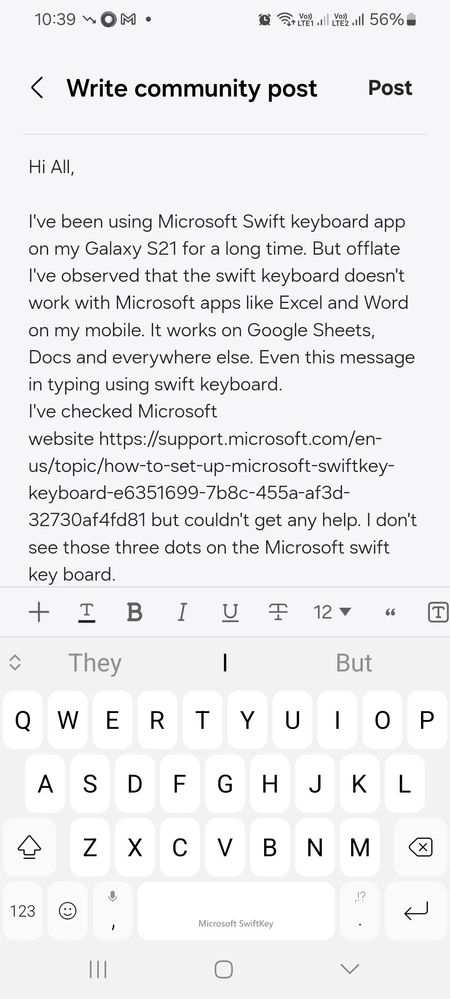
I've been using Microsoft Swift keyboard app on my Galaxy S21 for a long time. But offlate I've observed that the swift keyboard doesn't work with Microsoft apps like Excel and Word on my mobile. It works on Google Sheets, Docs and everywhere else. Even this message in typing using swift keyboard.
I've checked Microsoft website https://support.microsoft.com/en-us/topic/how-to-set-up-microsoft-swiftkey-keyboard-e6351699-7b8c-455a-af3d-32730af4fd81 but couldn't get any help. I don't see those three dots on the Microsoft swift key board. I've attached the image of the swift keyboard that I see on my mobile. I'm using the keyboard theme Samsung Adaptive.
Would like to know if anyone knows how to enable the swift key on Microsoft apps.
Thank you.
cs_member10
Moderator
03-11-2024 10:12 AM
in
Dear Samsung Member,
Greetings from Samsung Customer Support!
As per your query, we request you to share the log file. This will help us to further investigate and resolve this issue.
To attach the log file: Samsung Members Application (Open Samsung Members Application > Support> Tap on error report > Type your query > Send).
Note: To ensure relevant log information is included in the error report, submit the report within 3 minutes of encountering the bug or error, and do not terminate (swipe away) the Samsung Members application until you are notified that the report has been sent. This can take up to 5 minutes.
Warm Regards,
Samsung Customer Support
0 likes