
Why I'm not able to select "keep open for quick launch feature for any of the applications. Here is the screen shot I've attached.
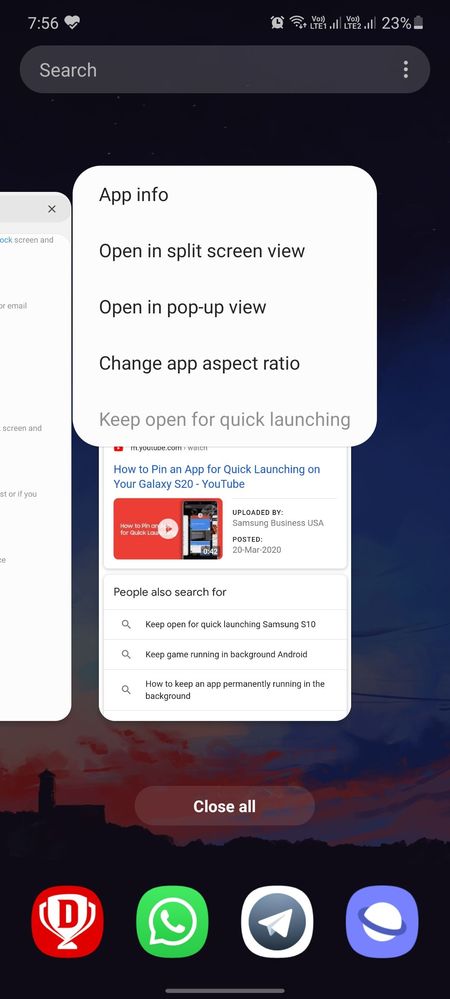
Same feature was there in one UI 2.1 as a lock app but after updating to one UI 2.5 it renamed as Keep open for quick launching.
I tried reset/safe mode/restart phone but same issue.
Device : galaxy s10 lite
SliceSupport
Active Level 10
6 years ago
in
and Does it happens to all apps or for just selected app
General Solution
Go to Apps > Configure apps > Battery optimization > All apps. Find the apps you are seeing this problem with and disable them.If you want to make sure that an app keeps running in the background, you can “lock” the app. Open the app. Then launch the Recent Apps page. Tap the app icon and select “keep open for quick launching.” Once done, you can remove it by tapping on the lock icon at the bottom right of the app in the Recents page.
please note : there is limitation that how many apps you can keep running in the background.
hesamhajati
Active Level 1
6 years ago
in
my problem is that when I close all apps in the recent app view, they all go away. now if I open an app and click "keep open" it says there are 2 apps kept open for quick launching (while I can only see one app that I chose with the lock icon beneath). tried your method it didn't work.
ForeverKnight
Active Level 3
4 years ago
in
0 likes
disheet17
Active Level 1
6 years ago
in
hesamhajati
Active Level 1
6 years ago
in
tried it. didn't help
on galaxy note 10+ recently updated
0 likes
hesamhajati
Active Level 1
6 years ago
in
this is a cool feature you just taught me, but it didn't solve the stated problem we're having. But really thanks tho
RobinB
Beginner Level 2
5 years ago
in
0 likes
disheet17
Active Level 1
6 years ago
in
Ehsank
Expert Level 5
6 years ago
in
then you can also do a wipe cache partition
Wipe Cache Partition.
Steps to perform.
1) Turn off the device.
2) Press and hold the Volume Up key and the spower button.
3) When the Android logo displays, release all keys.
4) Press the Volume down key to navigate and select "Wipe cache partition".
5) Press Power key to select. When the wipe cache partition is complete, Select Reboot System.
6) Press the Power key to restart the device.
RobinB
Beginner Level 2
5 years ago
in
0 likes
disheet17
Active Level 1
6 years ago
in
0 likes
Ehsank
Expert Level 5
6 years ago
in
0 likes
Ehsank
Expert Level 5
6 years ago
in
i attached image
RobinB
Beginner Level 2
5 years ago
in
0 likes
disheet17
Active Level 1
6 years ago
in
0 likes
Ehsank
Expert Level 5
6 years ago
in
0 likes
disheet17
Active Level 1
6 years ago
in
Samsung_Support3
Moderator
6 years ago
in
Dear Samsung Member,
Greetings from Samsung Customer Support!
Please register your concern in Samsung Members Application (Open Samsung Members Application > Get help > Send Feedback > Error report/Ask questions).
Thank you for writing to Samsung.
Warm Regards,
Samsung Customer Support
0 likes
Lecest
Beginner Level 2
6 years ago
in
I believe only 3 apps can be kept open at any one time? At least it is for me.
0 likes
ForeverKnight
Active Level 3
4 years ago
in
imbashid
Active Level 1
6 years ago
in
0 likes