
Hello!
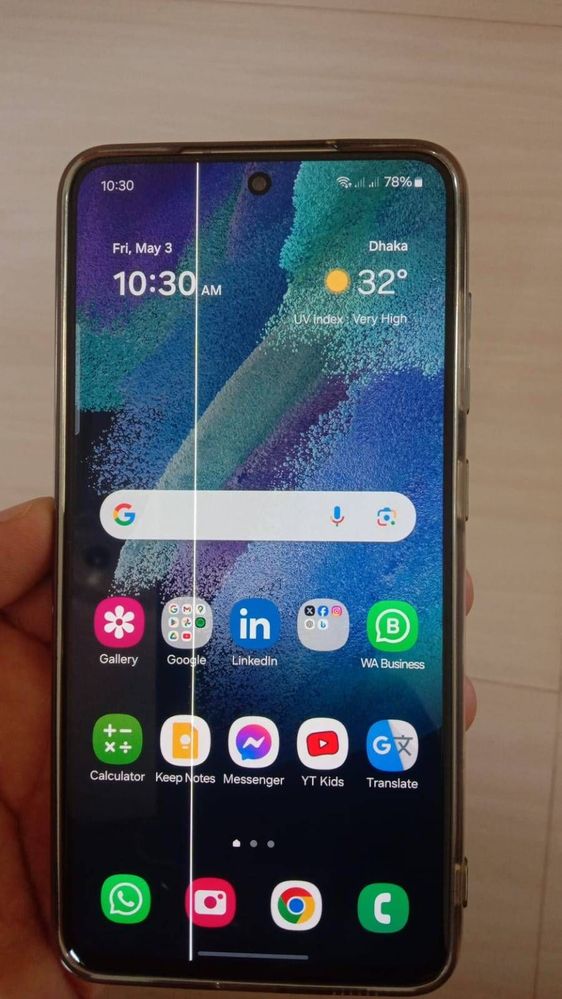
I am getting mobile display problem of white line.
Model: Samsung Galaxy S21FE
Problem: Display White line problem facing from 2nd May 2024 without a injury.
Please suggest how can I get problem solution. 🙏
How can I get solution of this problem? After the last OS updated mobile over heating and slow working. Finally display White line problem.
S_Kumar73
Expert Level 5
05-4-2024 12:49 AM
in
Batman10
Active Level 4
05-4-2024 01:53 AM
in
Guess they are evolving gradually 🤣
0 likes
SauRabhji
Expert Level 1
05-4-2024 08:05 AM
in
Samsung strategy for screen replacement....more screen sell more money earn......and this is a little kindness for Samsung service center from Samsung 🤣 🤣 🤣
0 likes
goodthings
Expert Level 5
05-4-2024 01:04 AM
in
0 likes
Kamruzzaman1
Active Level 3
05-4-2024 03:16 AM
in
0 likes
cs_member10
Moderator
05-4-2024 03:35 AM
in
Dear Samsung Member,
Greetings from Samsung Customer Support!
As per your concern, we would request you to kindly perform the following steps to resolve your issues. However, we are taking your valuable feedback regarding this.
Galaxy device heating issue: https://www.samsung.com/in/support/mobile-devices/why-the-device-heats-up-during-use/
Galaxy device performance issue: Kindly check the space on your device:
Path: Settings > Battery and device Care > Storage
To improve the device performance there should be sufficient space.
Kindly check the RAM in your device:
Path: Settings > Battery and Device Care > Memory
The device's RAM should be free to improve performance. So clear the RAM once a day.
Clear app cache through Device care:
Tap on Settings>Device Care> Storage> Clean Now.
The clear cache memory of a particular application:
Settings > Apps > Now pick the app that you like to clear off the cache memory > Storage > Clear Cache.
Is there any unnecessary application running in the background?
Kindly close the background running applications in the device (Tap the left side key & close the background running application).
Kindly uninstall that application by following the below steps and check once as the issue might occur due to third-party applications: Settings> Apps> Select the third-party application from Apps> Uninstall.
Kindly check if you are using a memory card on your device.
If you are using the memory card on your device. we will advise you to safely remove it from your device. For this follow the below steps:
Step 1: Before removing the memory card, first, unmount it for safe removal.
On the Home screen, tap Apps > Settings > Device maintenance > Storage > More option > Storage settings > SD card > Unmount. Insert the ejection pin into the hole on the tray to loosen the tray.
Note: Ensure that the ejection pin is perpendicular to the hole. Otherwise, the device may be damaged.
Step 2: Pull out the tray gently from the tray slot.
Step 3: Remove the memory card.
Step4: Insert the tray back into the tray slot
Note: Please ensure that the memory card is not removed while the device is transferring or accessing information. Doing so can cause data to be lost or corrupted or damage to the memory card or device.
Samsung is not responsible for losses that result from the misuse of damaged memory cards, including the loss of data.
If you enabled Power Saving Mode, Power saving mode limits the performance of the device. So we recommend disabling the Power Saving mode in your device.
Galaxy device line issue: Update the software if available: https://www.samsung.com/in/support/mobile-devices/samsung-galaxy-smartphone-how-to-update-software/
You can reset your device by following the steps from the below link.
https://www.samsung.com/in/support/mobile-devices/samsung-galaxy-mobile-how-to-perform-a-factory-reset/
In case the issue still occurs, please visit the service center for a physical inspection of your device. You can locate your nearest service center with this given link: https://www.samsung.com/in/support/service-center/
Warm Regards,
Samsung Customer Support
0 likes
prashantw511
Active Level 3
05-5-2024 12:08 AM
in
I recommend that you review the news articles published by various newspapers and news channels. As a working journalist, I am familiar with the process and understand the significance of PR events and how they can influence public perception.
The articles suggest that Samsung India may have intentionally disseminated misleading and false information through newspapers, which could be considered deceptive to customers. It is important to note that business relies on trust and the value of the company's reputation.
Sincerely,
[PrashantWaghmare]
Mantralaya Ani Vidhimandal Varthar Sangh ( President )
Executive Editor
Dainik Lokshahi
0 likes
SAK2024
Beginner Level 2
05-11-2024 03:59 PM
in
0 likes
ChandraManikanta
Active Level 4
06-16-2024 10:02 AM
in
I have faced a white line issue after one ui 6.1 update
Initially, I contacted the samsung helpline number, and they said to visit the service center
So, I have visited the service center and raised the job sheet ( including the IQC test ).
Service center members are saying there is no policy right now, and they said replacement is based on chargeable ( around 12k for s21fe)
Again, I have contacted the helpline number, and they are saying it's usage fault. So I have asked if it's a usage fault only limited people will face the problem, not a bulk amount of users ( there is no answer from him ) and connected call to a higher department ( decision-making department)
Had a few minutes of conversation with the higher department and asked to send the bill copy of the mobile
After a few days, they called back and said that due to a software update, you are facing the line issue. We are ready to provide a discount on your display, and the final amount after discount is 531/- rupees.
Service center placed order of the part waiting for replacement
If your phone doesn't have any physical or liquid damage and is used in a proper way, Samsung always helps us.
Contact the right person for your problem.
0 likes