
I purchased this phone 2 weaks ago .
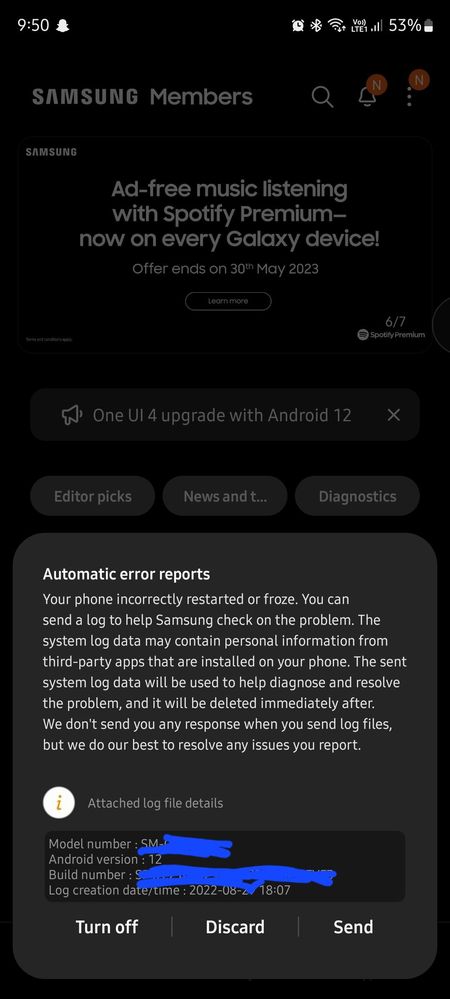
I've experienced auto restarting issue 2 times . I dont know why , i wonder is there any other users having this same issue and im looking forward to a solution for this issue .
When i entered Samsung Members app i got a pop-up , i attached the screenshot of pop on this post . So please help me to find a solution regarding this problem.
Is this a software problem or hardware problem or any kind of bugs?
My device is Samsung S20 Fe 5G
Anonymous User
Beginner Level 1
4 years ago
in
https://r2.community.samsung.com/t5/Tech-Talk/Important-Join-the-campaign-to-help-users-who-are-facing-restart/td-p/12104231
ㅤ
Expert Level 5
4 years ago
in
To know about this issue... read this..
https://r2.community.samsung.com/t5/Tech-Talk/autorestart-issue-in-samsung-phones/td-p/11059145
GalaxyF12user
Active Level 6
4 years ago
in
arnablaha
Active Level 6
4 years ago
in
0 likes
Sid_Karna
Expert Level 5
4 years ago
in
0 likes
SrajTech
Expert Level 5
4 years ago
in
0 likes
nikhil9193
Beginner Level 2
4 years ago
in
0 likes
nikhil9193
Beginner Level 2
4 years ago
in
0 likes
nikhil9193
Beginner Level 2
4 years ago
in
0 likes
Vishavnath
Active Level 6
4 years ago
in
0 likes
JithinAjith
Expert Level 3
4 years ago
in
0 likes
cs_member8
Moderator
4 years ago
in
Dear Samsung member,
Greetings from Samsung customer support.
We acknowledge your query and apologize for the inconvenience caused to you and will surely assist you regarding the same and please follow the easy troubleshooting steps which might help to solve the issue.
There are two methods to disable the auto-restart function
Method 1: From the home screen swipe up or down to access the App Screen > Setting > General Management > Reset > Auto Restart > To Turn OFF auto-restart slide the slider toward the left.
Method 2: Go to 'Settings'>>Tap on 'Battery and device care'>> Tap on Three dots>>Tap on 'Automation'>>Disable 'Auto-restart at set times' if enabled
If you are facing this issue after installing any new application then uninstall that application.
Navigate to the Apps screen and tap on Settings>>Tap on Apps>>Tap on the desired app>>Tap on Uninstall>>Tap on OK
Reset settings: From the home screen, click on Settings>>General Management>> click on reset and then reset setting.
In case the issue still occurs. Please register your concern in Samsung Members Application (Open Samsung Members Application > Get help > Send Feedback > Error report/Ask questions).
Thank you for writing to us.
Warm Regards,
Samsung Customer Support.
0 likes