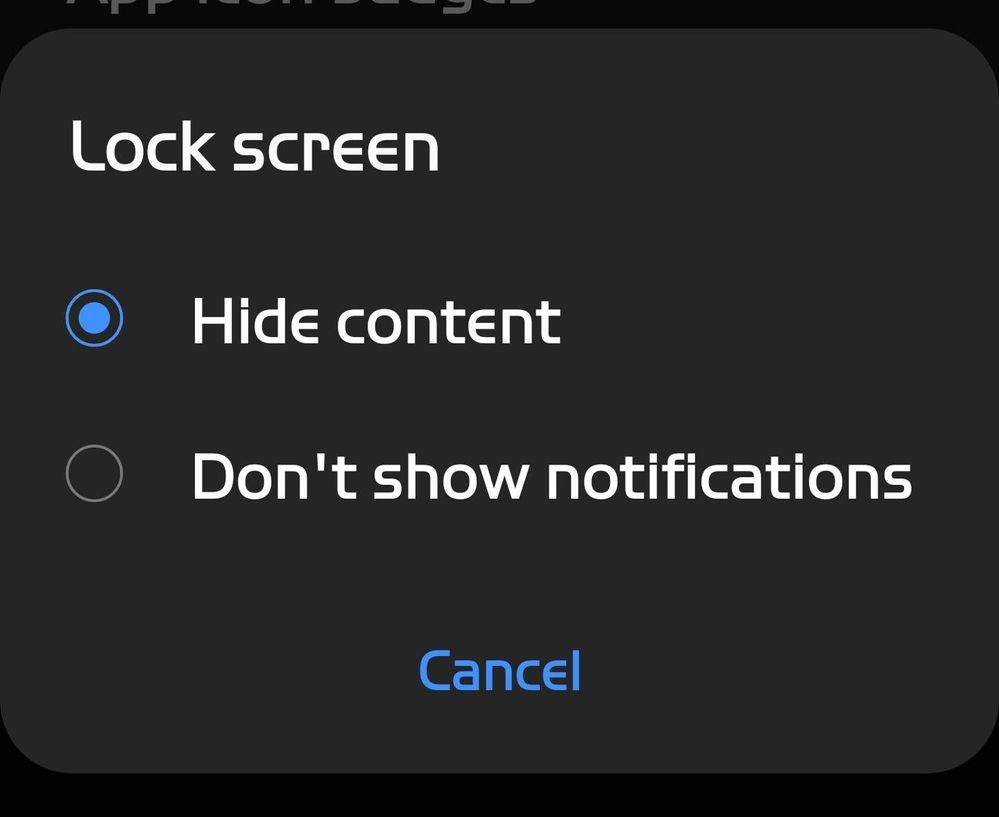
new problem has started. The option to show notification content on lock screen got removed. Only hide content and block notification options are there, ideally show content on lock screen option should also appear
Be assured, to resolve the issue please follow below given steps:-
1. Check device in safe mode:- Using Safe Mode on a Samsung phone allows you to force the device to run the essential operating system, and disable most 3rd party applications. To enter in safe mode:- Press and hold the Power key, when Power off icon appears > Press and hold the power off icon. To exit safe mode restart the device.
2. Reset the device:- Before resetting, kindly create data backup of your device via SMART switch mobile application or http://www.samsung.com/in/support/smartswitch pc suite. How to reset:- Settings > General management > Reset.
If the issue still persist, kindly register your concern in Samsung Members app along with short video, screenshot and error log file(Samsung Members app > Get help > Feedback > Error report/ask question). Note: Please send device log files within 15 minutes of issue occurrence along with the exact issue details.
do you really suggest customers to remove all 3rd party apps as a solution? whyshould someone use a phone for? only to make & receive calls & SMS? and spend more. than a lac on a phone for that?

Vrang
Active Level 9
6 years ago
in
0 likes
SAURAVMISRA
Active Level 9
6 years ago
in
0 likes
Vrang
Active Level 9
6 years ago
in
0 likes
SAURAVMISRA
Active Level 9
6 years ago
in
Vrang
Active Level 9
6 years ago
in
0 likes
SAURAVMISRA
Active Level 9
6 years ago
in
0 likes
cs-member13
Expert Level 4
6 years ago
in
Dear Samsung Member,
Greetings from Samsung Customer Support!
Be assured, to resolve the issue please follow below given steps:-
1. Check device in safe mode:- Using Safe Mode on a Samsung phone allows you to force the device to run the essential operating system, and disable most 3rd party applications.
To enter in safe mode:- Press and hold the Power key, when Power off icon appears > Press and hold the power off icon.
To exit safe mode restart the device.
2. Reset the device:- Before resetting, kindly create data backup of your device via SMART switch mobile application or http://www.samsung.com/in/support/smartswitch pc suite.
How to reset:- Settings > General management > Reset.
If the issue still persist, kindly register your concern in Samsung Members app along with short video, screenshot and error log file(Samsung Members app > Get help > Feedback > Error report/ask question).
Note: Please send device log files within 15 minutes of issue occurrence along with the exact issue details.
Thank you for writing to Samsung.
Warm Regards,
Samsung Customer Support
0 likes
SAURAVMISRA
Active Level 9
6 years ago
in
0 likes