
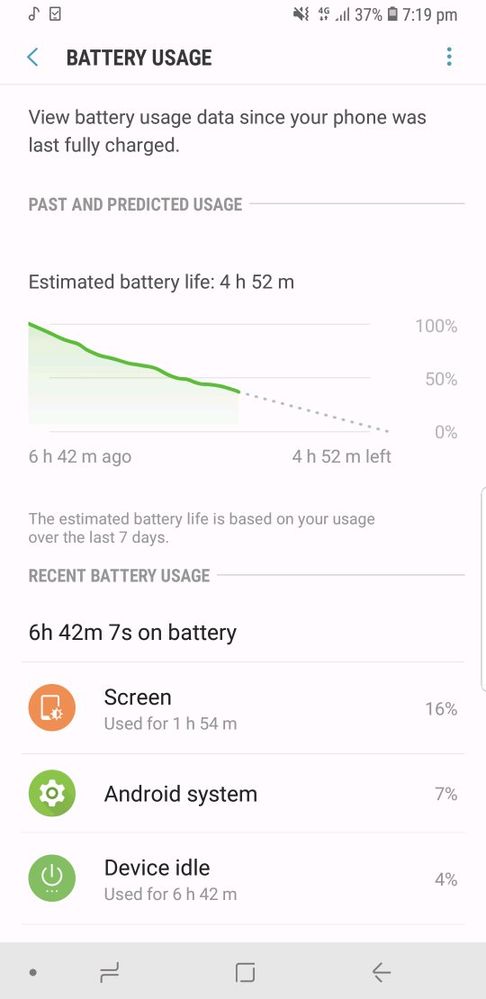
Note 8 battery draining very rapidly, have to charge phone 2 3 times im not a heavy user my phone is kept idle most of the time, as you can see in the picture my phone was idle for 7hrs then also the battery drained so much. Pls rectify this with an update
Anonymous User
Beginner Level 1
01-21-2019 02:11 PM
in
0 likes
Mahi3
Active Level 3
01-21-2019 02:16 PM
in
0 likes
Goldychahal
Expert Level 1
01-21-2019 03:07 PM
in
Nexian
Active Level 5
01-22-2019 09:20 AM
in
0 likes
admin_
Expert Level 5
01-23-2019 09:03 AM
in
1) We recommend you to charge you handset with original wall charger that came with your handset sales pack.
2) Kindly clean the charging point of your charger and battery with a dry and soft cotton cloth to remove unwanted accumulation of dust/waste material.
3) You can also check the charging process while device is in switched off mode.
4) We also suggest you to charge your handset with alternate Samsung Approved charger to exclude the possibility that current charger is not the root cause of failure.
5) Check whether Bluetooth, WI-FI, GPS, Bluetooth, NFC / S Beam, Tethering and Portable Hotspot is turned off when not in use.
6) Check whether the brightness of the device is set to minimum.
7) Smart Features in Flagship phones like Motion UI, Smart Stay, Air Gestures, and Screen Mirroring / Smart view etc. will drain battery considerably.
😎 Check Power Saving Mode (If available)
9) Auto Sync of E-mails, App data etc. will drain battery.
10) Multiple Applications running in back ground will drain battery power.
11) Network Fluctuation also drains battery.
12) Minimizing the back-light time would save battery.
13) Follow the standard charging procedure (i.e. charge a fully discharge battery in Switch-off mode up to 150 minutes.)
14) Periodic Software Update through KIES, FOTA or Smart Tool is intended to improve the battery life as well.
• (Setting>>About Device>>Software Update>>Update) update using 4G/3G/ WI-FI connectivity.
15) Check by Go to setting>Application Manager>Running>Stop downloaded application when not in use.
16) After doing the above procedure, kindly restart your device and check the performance.
17) Check the issue in the safe mode.
If issue still persists, KIndly provide logs/video within 15 minutes of issue occurrence by registering this feedback via Samsung member application i.e. Samsung member BETA app> BETA feedback>Sendfeedback>Error report>Collect log files>attach.
Be sure to hit ♡ when you find an answer that works for you. For Further assistance, you can get in touch with us via Live Chat option by following- http://livechat.support.samsung.com/Customer_new/IN. You can also connect us via Samsung Members web community by following mentioned url https://community.samsungmembers.com/en_IN#/
0 likes