title:

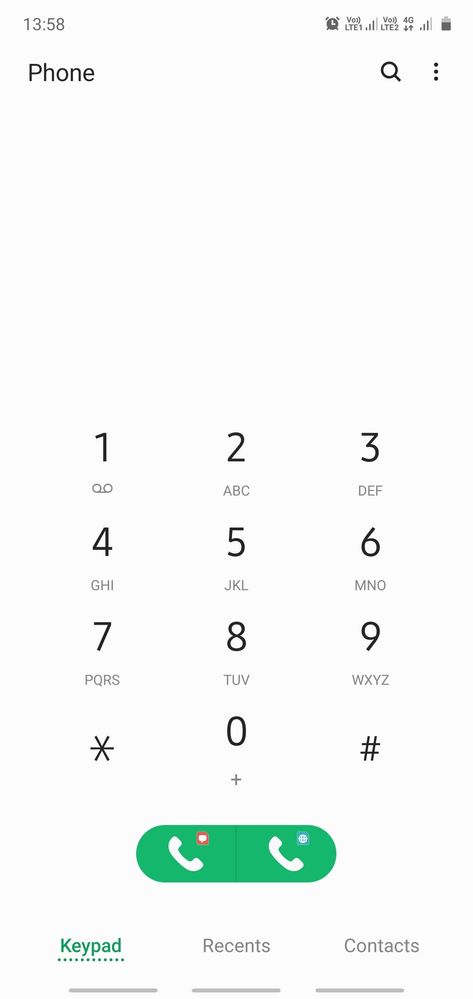
SIM card icons got changed

(Post creation time:  

03-5-2020 08:38 AM

)

605 Views

T

TharaFuffa

Active Level 5

last edited


03-5-2020 08:38 AM


in

 
After the recent update I'd received, my SIM card icons got changed and further I am not able to restore them to the pre set icons.

image


    • D

      Dilli

      Expert Level 5

      03-5-2020 09:23 AM


      in

       
      restart you you phone and check, if issue is still there open goodlock if you have installed same and put quick star off then on. Check again.
      also go to connection and open sim card manager and press on respective sim to change icon to your desire

      0 likes

    • T

      TharaFuffa

      Active Level 5

      03-5-2020 09:29 AM


      in

       
      it's not working with any of your solutions.

      0 likes

    • S

      Shahinmarzia

      Expert Level 5

      03-5-2020 09:44 AM


      in

       
      Change your icon like as picture
      T

      TharaFuffa

      Active Level 5

      03-5-2020 10:59 AM


      in

       
      Not working, the icons are still unchanged after changing from here.
    • D

      Dilli

      Expert Level 5

      03-5-2020 10:10 AM


      in

       
      then take backup and reset your phone to factory default

      0 likes

      T

      TharaFuffa

      Active Level 5

      03-5-2020 11:00 AM


      in

       
      Does every little concern needs factory reset?

      0 likes

      D

      Dilli

      Expert Level 5

      03-5-2020 11:25 AM


      in

       
      well not always. sometime apps play havoc in background and if matter is not solved easily then this is only method. in any case it has been said that before major upgrades one should take backup and reset device. Many issues has got resolved in this manner.

      0 likes

    • G

      Gst26

      Expert Level 5

      03-5-2020 11:02 AM


      in

       
      Need not to worry...Go to Connections→Sim card manager→General Settings→Select Operator icons/Logo then Icon and select as per your choice... Screenshots attached...

      0 likes

      T

      TharaFuffa

      Active Level 5

      03-5-2020 11:19 AM


      in

       
      The previous icons I used are not setting up now.

      0 likes

      D

      Dilli

      Expert Level 5

      03-5-2020 11:26 AM


      in

       
      this is exactly what I had mentioned earlier but it seems his issue is not resolved

    Related Content

    SIM card

    Sim card