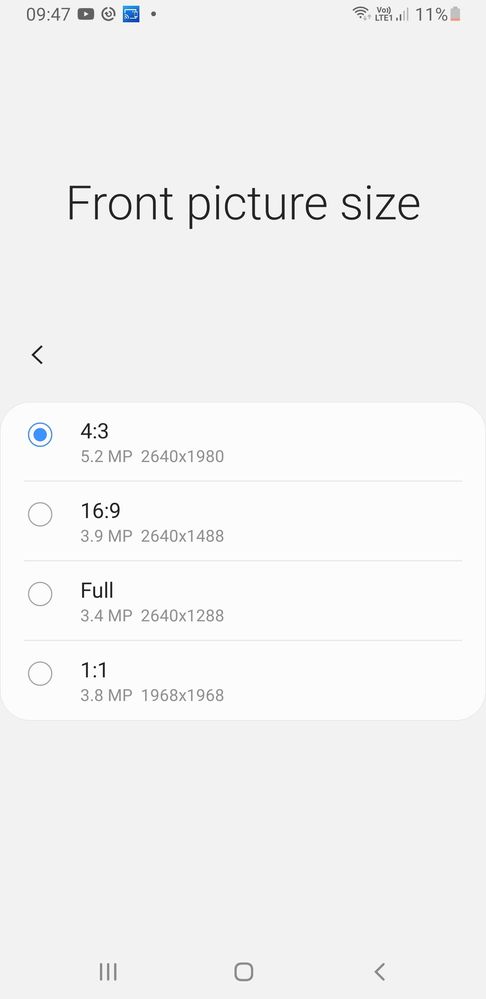
After service of Galaxy Note 9 with display and back panel change and software update.the front camera setting shows 5.2 megapixel instead of 8 megapixel...no other option to change it.is it the error or any suggestion....
Thank you for sharing your concern. We acknowledge your query and apologize for the same. We apologize for the inconvenience you are facing And please follow the easy troubleshooting steps which might help to solve the issue.
Please follow the below steps:
Step1: From the home screen tap on Camera. Step2: Tap on Settings. Step3: Scroll up and tap on Reset settings. Step4: Tap on Reset.
In case the issue still occurs. Please register your concern in Samsung Members Application (Open Samsung Members Application > Get help > Send Feedback >Ask questions).
Samsung Camera Not Working (Camera Failed Warning): Solution 1: Restart the Camera. Solution 2: Restart your Device. Solution 3: Clear camera cache and data. Solution 4: Clear gallery cache and data. Solution 5: Turn Off Smart Stay. Solution 6: Restart in Safe Mode. Solution 7: Wipe cache partition.

cs_member8
Moderator
06-1-2022 08:38 AM
in
Dear Samsung member,
Greetings from Samsung customer support.
Thank you for sharing your concern. We acknowledge your query and apologize for the same. We apologize for the inconvenience you are facing And please follow the easy troubleshooting steps which might help to solve the issue.
Please follow the below steps:
Step1: From the home screen tap on Camera.
Step2: Tap on Settings.
Step3: Scroll up and tap on Reset settings.
Step4: Tap on Reset.
In case the issue still occurs. Please register your concern in Samsung Members Application (Open Samsung Members Application > Get help > Send Feedback >Ask questions).
Thank you for writing to Samsung.
Warm Regards,
Samsung Customer Support
0 likes
Willjoe
Active Level 1
08-9-2022 06:40 AM
in
Samsung Camera Not Working (Camera Failed Warning):
Solution 1: Restart the Camera.
Solution 2: Restart your Device.
Solution 3: Clear camera cache and data.
Solution 4: Clear gallery cache and data.
Solution 5: Turn Off Smart Stay.
Solution 6: Restart in Safe Mode.
Solution 7: Wipe cache partition.
Hope this helps