
title:

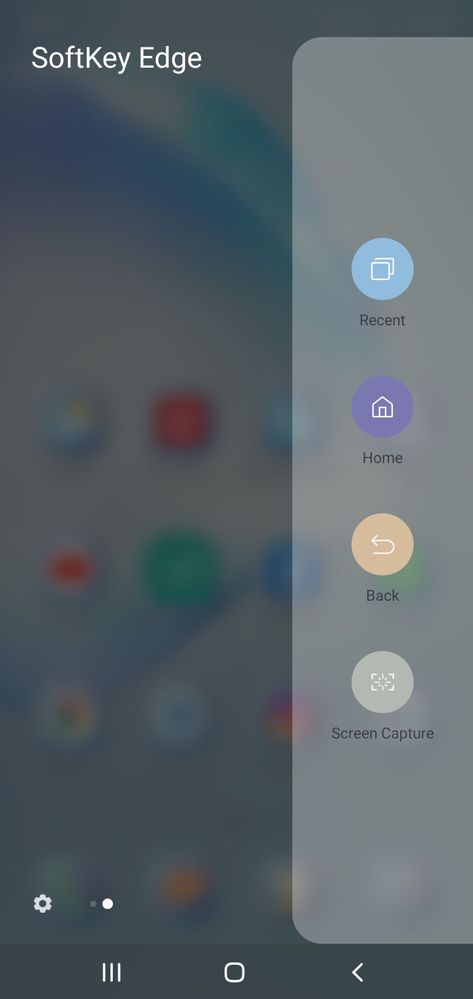
Lock button disappeared from the edge panel

(Post creation time:  

02-11-2020 10:00 AM

)

1109 Views

H

HarpreetSinghMakol

Expert Level 3

last edited


02-11-2020 10:00 AM


in

 
Dear Connections,

Please help, lock button is disappeared from the edge panel after updating the edge panel.

See screenshot....

image

Earlier, there use to be a lock button which was way too convenient to lock the device now I have to completely rely on the hard hardware button....
  • D

    DeanHunter

    Active Level 6

    02-11-2020 10:04 AM


    in

     
    old habit of Samsung. ruin the best features and give the C rappy one
  • AU

    Anonymous User

    Beginner Level 1

    02-11-2020 10:16 AM


    in

     
    mine is here what are you talking
    AU

    Anonymous User

    Beginner Level 1

    02-11-2020 02:35 PM


    in

     
    ok
    H

    HarpreetSinghMakol

    Expert Level 3

    03-12-2020 06:06 AM


    in

     
    do you still have that lock button in your softedge panel...?

    0 likes

    AU

    Anonymous User

    Beginner Level 1

    03-12-2020 06:11 AM


    in

     
    yes for now
  • AU

    Anonymous User

    Beginner Level 1

    02-11-2020 10:19 AM


    in

     
    you can use the one hand operation plus also
    H

    HarpreetSinghMakol

    Expert Level 3

    02-11-2020 10:31 AM


    in

     
    but if i want to add the lock scree button again in the soft edge panel, then how can this be done..??

    0 likes

  • S

    Shubham36912

    Active Level 1

    02-11-2020 10:38 AM


    in

     
    try to reinstall the edge panel
  • D

    Dilli

    Expert Level 5

    02-11-2020 11:10 AM


    in

     
    Correct lock button is no more in the panel. The developer made a mess
    H

    HarpreetSinghMakol

    Expert Level 3

    02-11-2020 12:27 PM


    in

     
    Really absurd thing....Samsung likes to ruin there best features...as other phones improvise their features with the recent updates on the contrary samsung likes to take away the best features.... Sad...
  • S

    S_Kumar73

    Expert Level 5

    02-13-2020 12:08 AM


    in

     
    I don't thing it's necessary, to lock we can simply pressing the power button (my view only). instead opening the side button and swipe to select the slide and then lock the screen is taking lot of actions and time consuming.
    H

    HarpreetSinghMakol

    Expert Level 3

    02-13-2020 03:19 AM


    in

     
    That was way too convenient for me...ideally you should use Hardware buttons as less as you can...

    0 likes

  • S

    S_Kumar73

    Expert Level 5

    02-13-2020 11:59 PM


    in

     
    ok

    0 likes

  • AU

    Anonymous User

    Beginner Level 1

    03-12-2020 06:14 AM


    in

     
    I dint updated it yet thanks for letting me know