
When i set a contact image, why is it shown in a small circle and not the whole screen ? Whats the use of WQHD 6'3 inch display if the contact image has to be shown in just a small circle!?
PLEASE UPDATE IT TO FULL SCREEN!
THIS IS REALLY ANNOYING TO NOT BEEN ABLE TO USE SUCH A BEAUTIFUL DISPLAY IN SETTING CONTACT IMAGE!
i was earlier using iPhone and iPhone uses the whole screen to display contact image when someone calls and it looks so good even in 5.5.inch screen.
Whats the benifit of using the best display in market and seeing contact image in a small circle ??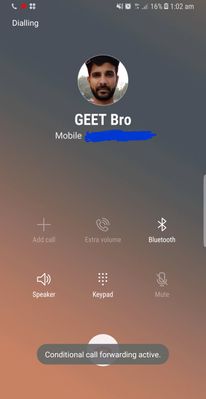
PLEASE UPDATE IT TO FULL SCREEN!
THIS IS REALLY ANNOYING TO NOT BEEN ABLE TO USE SUCH A BEAUTIFUL DISPLAY IN SETTING CONTACT IMAGE!
i was earlier using iPhone and iPhone uses the whole screen to display contact image when someone calls and it looks so good even in 5.5.inch screen.
Whats the benifit of using the best display in market and seeing contact image in a small circle ??
GalaxyTeam
Active Level 7
02-3-2018 01:17 AM
in
Note 8 Telegram Group for Indian Users
230+ Members
0 likes
sumitraj
Beginner Level 2
02-3-2018 01:23 AM
in
0 likes
Lauki
Active Level 10
02-3-2018 03:04 AM
in
smanojprbhakar
Beginner Level 2
02-3-2018 08:28 AM
in
0 likes
admin_
Expert Level 5
02-3-2018 03:06 PM
in
Be sure to hit ♡ when you find an answer that works for you. For Further assistance, you can get in touch with us via Live Chat option by following- http://livechat.support.samsung.com/Customer_new/IN. You can also connect us via Samsung Members web community by following mentioned url-https://community.samsungmembers.com/en_IN#/
0 likes
lpriya
Active Level 1
02-5-2018 02:46 PM
in
please have a back up of your contacts then
go to settings - apps - click on 3 dots - select show system apps - now go to Contact storage - clear the data. and get a back up contacts or save new contacts. it's working for me
0 likes
ThisIsAman
Active Level 1
02-5-2018 02:55 PM
in
0 likes