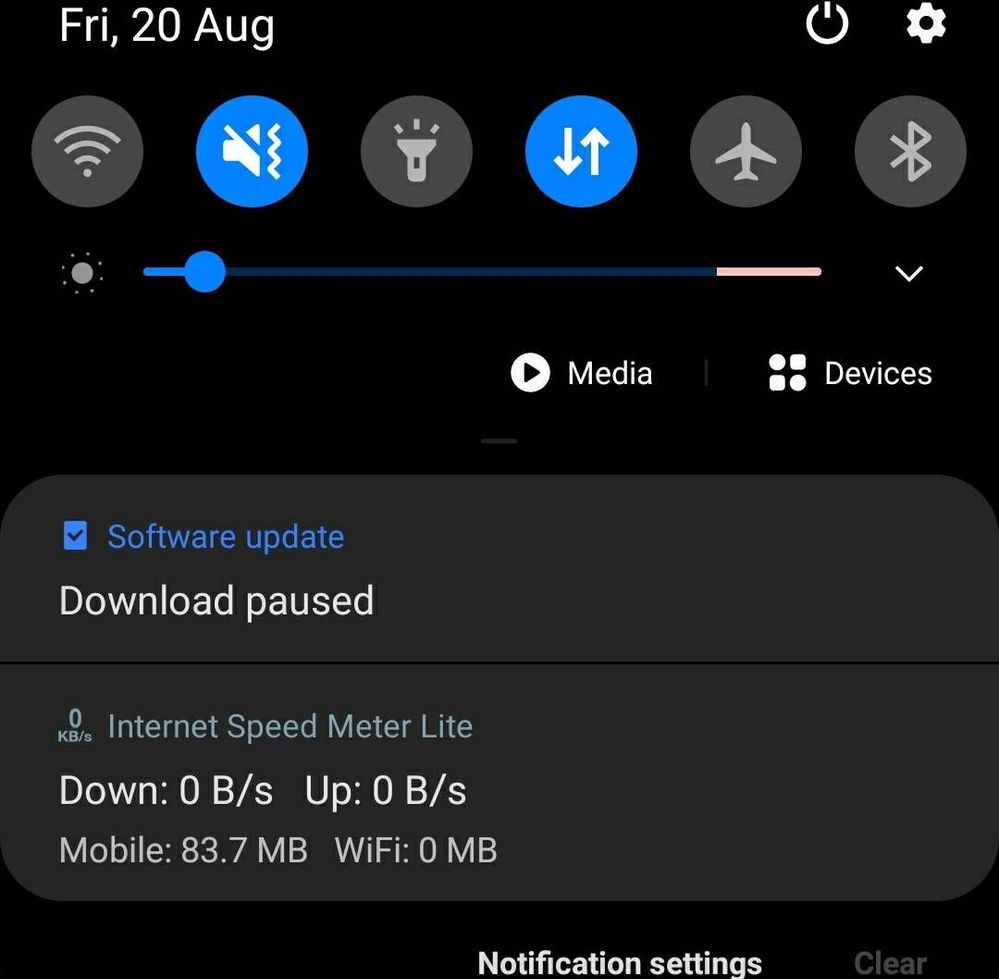
Try This : long press on notification, click settings tap on icon, then tap icon on software update icon like 2nd picture and then you'll get settings of software update try clearing its cache if still notification is there clear the data of software updates IF IT HELPS CLICK ON 3 DOT AT THIS COMMENT AND CLICK ACCEPT AS SOLUTION. Have a nice day.
Download & install the update It will go As it is one of the main system core activities notification which cannot be turned off If you clearing the data it will go for some point of time but it will reappear as soon as possible

RαʝҽʂԋKυɱαɾ21
Expert Level 5
5 years ago
in
0 likes
Hardik1947
Active Level 1
5 years ago
in
0 likes
iamgeek
Active Level 6
5 years ago
in
long press on notification, click settings tap on icon,
then tap icon on software update icon like 2nd picture and then you'll get settings of software update
try clearing its cache
if still notification is there clear the data of software updates
IF IT HELPS CLICK ON 3 DOT AT THIS COMMENT AND CLICK ACCEPT AS SOLUTION. Have a nice day.
0 likes
RαʝҽʂԋKυɱαɾ21
Expert Level 5
5 years ago
in
TRY THIS APP TILL YOU UPDATE YOUR PHONE'S SOFTWARE UPDATE
USING THIS YOU CAN HIDE YOUR CHOICES NOTIFICATION
TRY THIS !
IT MAY HELPFUL YOU
IF IT'S SOLVE YOUR PROBLEM ACCEPT AS SOLUTION BY CLICKING ON 3DOTS OF COMMENT 👍
0 likes
Anonymous User
Beginner Level 1
5 years ago
in
It will go
As it is one of the main system core activities notification which cannot be turned off
If you clearing the data it will go for some point of time but it will reappear as soon as possible
0 likes