
title:

Remaster Bug after One UI 7 Update in M35

(Post creation time: ย 

2 years ago

)

1012ย Views

M

MrinkDilk

Active Level 3

last edited

ย 

2 years ago

ย 

in

ย 
It seems that there is a bug in M35 after One UI 7 update where if you remaster a picture using the gallery, the remastered pictures comes out significantly darker, which was not the case before. 
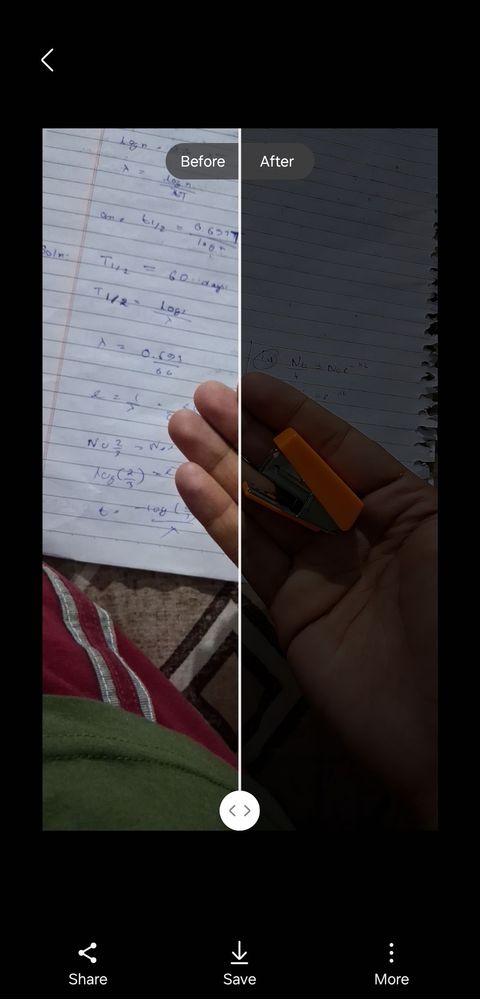
Who Else has got the same issue?

image


  • S

    somanath_sahu

    Active Level 10

    2 years ago

    ย 

    in

    ย 
    It's confused ๐Ÿ˜‚
    S

    somanath_sahu

    Active Level 10

    2 years ago

    ย 

    in

    ย 
    You got the ui 7 today?
    M

    MrinkDilk

    Active Level 3

    2 years ago

    ย 

    in

    ย 
    yes.
    S

    somanath_sahu

    Active Level 10

    2 years ago

    ย 

    in

    ย 
    Then it's normal bro , initially you may face some issues .

    0 likes

  • B

    biswajit6780

    Active Level 2

    2 years ago

    ย 

    in

    ย 
    Update Aneka Baat camera thoda kharab ho gaya

    0 likes

  • G

    goodthings

    Expert Level 5

    2 years ago

    ย 

    in

    ย 
    Kindly complaint to Samsung customer support through Samsung Members App as error report also send log files Along with this error report for this issue and wait for next update may be fix it by Samsung team soon. If you like please accept as a solution it's help to others users also, click on 3dots in my reply section and click on accept solution. Thanks.

    0 likes

  • G

    goodthings

    Expert Level 5

    2 years ago

    ย 

    in

    ย 
    Your's most welcome to here.

    0 likes

  • B

    bhavint

    Active Level 6

    2 years ago

    ย 

    in

    ย 
    Initially, I was also facing the same issue but later it got solved automatically. The camera quality improved a lot after the updateโค

    0 likes

  • C

    cs_member10

    Moderator

    2 years ago

    ย 

    in

    ย 

    Dear Samsung Member,

    Greetings from Samsung Customer Support!

    We request you kindly share the log file. Also, share the video clips for better understanding. This will help us to investigate further and resolve this issue.

    To share the log file: Open Samsung Members Application > Support> Tap on send feedback> Choose Composer> Select error report> Select the appropriate issue category> Type your query and send.

    Note: To ensure relevant log information is included in the error report, submit the report within 3 minutes of encountering the bug or error, and do not terminate (swipe away) the Samsung Members application until you are notified that the report has been sent. This can take up to 5 minutes.

    Warm Regards,
    Samsung Customer Support

    0 likes

    N

    NoWhereToBeFound

    Active Level 1

    2 years ago

    ย 

    in

    ย 
    Well i have a video recorded but I can't send as there's no option

    0 likes

    V

    virenderkumar8990

    Active Level 1

    1 year ago

    ย 

    in

    ย 
    Sent the logs but the issue has not yet been rectified. Kindly issue doa letter as device purchased 2 days before
  • N

    NoWhereToBeFound

    Active Level 1

    2 years ago

    ย 

    in

    ย 
    Same here

    0 likes

  • V

    virenderkumar8990

    Active Level 1

    1 year ago

    ย 

    in

    ย 
    Same problem facing. Kindly issue doa letter as device purchsed just for this feature and it is not working anymore.
  • S

    selenophile91529

    Active Level 3

    1 year ago

    ย 

    in

    ย 
    Yes I am having the same issue i have also sent a report to Samsung but no response till now...it's very frustrating as it is a very important and useful feature in day to day use...I just hope Samsung fixes this bug through an update fast.. Please share this problem as much as possible so that Samsung notices it and corrects it ASAP... Thank You

    0 likes