title:

How to remove

(Post creation time:  

01-3-2020 07:00 AM

)

1335 Views

I

imsaurabh19

Active Level 4

last edited


01-3-2020 07:00 AM


in

 
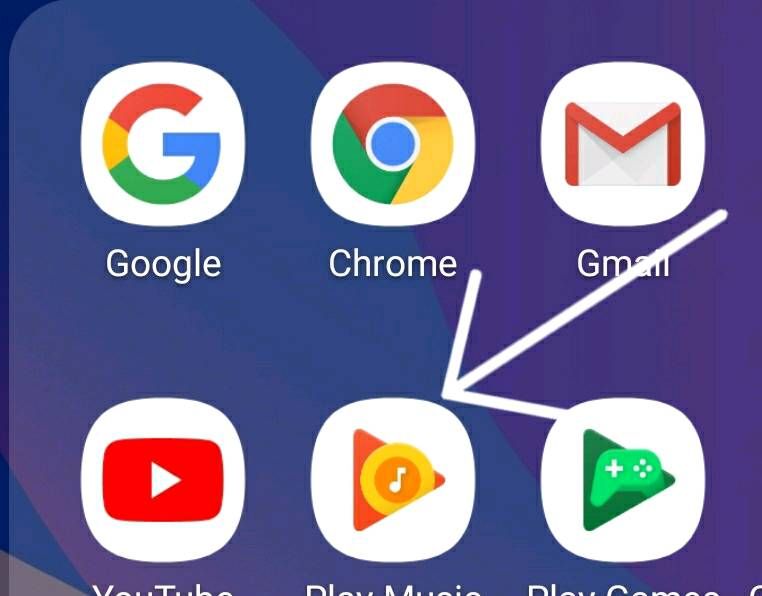
How to remove the white part of all apps in galaxy m20 device????

image


    •  

      Selected Answer

      AU

      Anonymous User

      Beginner Level 1

      01-3-2020 07:03 AM


      in

       
      not possible....this option was there in oreo version ....app without folder..now it's not there
    •  

      Selected Answer

      D

      dayarathore20

      Active Level 7

      01-3-2020 07:12 AM


      in

       
      bhai developer option me theming ka option hai last me wo is white part ko naya look de sakta hai 😁
      par ye nahi hatega abhi
    •  

      Selected Answer

      S

      Sidhabhi

      ★★

      01-3-2020 07:15 AM


      in

       
      Bro, you can't..frameless app option has been removed..you can download app icon of your choice from the galaxy store but there is no way to remove the white part..
    •  

      Selected Answer

      D

      dayarathore20

      Active Level 7

      01-3-2020 07:15 AM


      in

       
      theming ka option naya look dega
      D

      dayarathore20

      Active Level 7

      01-3-2020 08:17 AM


      in

       
      mai bhi m20 use kar raha hu

      0 likes

      I

      imsaurabh19

      Active Level 4

      01-3-2020 08:31 AM


      in

       
      It happened bro Thanks
      D

      dayarathore20

      Active Level 7

      01-3-2020 11:57 AM


      in

       
      👍👍👍👍👍👍

      0 likes

    •  

      Selected Answer

      K

      kaushikdamle

      Active Level 6

      01-3-2020 07:21 AM


      in

       
      goto application info and disable it
    •  

      Selected Answer

      A

      arnav12113

      Active Level 5

      01-3-2020 07:24 AM


      in

       
      long press the icon (play movie, play music, one drive) and tab the uninstall option
      some apps u can can uninstall it
      AU

      Anonymous User

      Beginner Level 1

      01-3-2020 11:39 AM


      in

       
      🤣🤣🤣joke of the millennium

      0 likes

      AU

      Anonymous User

      Beginner Level 1

      01-3-2020 11:39 AM


      in

       
      🤣🤣🤣🤣🤣

      0 likes

      A

      arnav12113

      Active Level 5

      01-3-2020 12:16 PM


      in

       
      no

      0 likes

    •  

      Selected Answer

      U

      UserAdik

      Expert Level 5

      01-3-2020 07:44 AM


      in

       
      long press and click disable then click ok then uninstall
      AU

      Anonymous User

      Beginner Level 1

      01-3-2020 11:39 AM


      in

       
      🤣🤣🤣🤣

      0 likes

    • Y

      01-3-2020 08:28 AM


      in

       
      Change launcher or use lawnchair or any other will help you

      0 likes

    • M

      MrGEEK

      ★★

      01-3-2020 10:36 AM


      in

       
      As you have got your answer from most of the users regarding your concern, I just want to add that you can try new icons from themes app of samsung if you like.

      AU

      Anonymous User

      Beginner Level 1

      01-3-2020 11:40 AM


      in

       
      yes

      0 likes

    Related Content

    How to remove

    How to remove

    How to remove

    HOW TO REMOVE IT

    how to remove