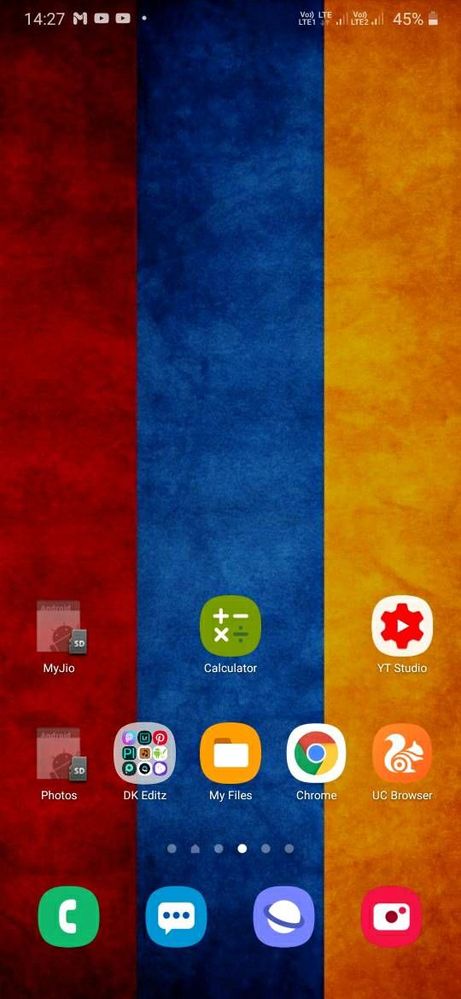
I have moved some apps apps to SD card. Sometimes it's not showing or working properly. Especially when my phone restarts. Those apps are unavailable since one week. Please tell me a solution.
Please be assured and you may need to try clearing the app cache and data within your Settings to resolve this issue:
>>>Launch your settings>apps>crashing app>storage>touch clear cache &clear data.
If the issue still persist, kindly register your concern in Samsung Members app (Samsung Members app > Get help > Feedback > Error report/ask question). Note: Please send device log files within 15 minutes of issue occurrence along with the exact issue details.

Mirens
Active Level 6
05-23-2020 09:19 AM
in
0 likes
Ashwin98
Active Level 8
05-23-2020 09:28 AM
in
Note: It is necessary to re Enable some settings in Developers options, since after phone restarts some settings will be back to default.
I think this may help you...
0 likes
cs_member10
Moderator
05-27-2020 10:24 AM
in
Dear Samsung Member,
Greetings from Samsung Customer Support!
Please be assured and you may need to try clearing the app cache and data within your Settings to resolve this issue:
>>>Launch your settings>apps>crashing app>storage>touch clear cache &clear data.
If the issue still persist, kindly register your concern in Samsung Members app (Samsung Members app > Get help > Feedback > Error report/ask question).
Note: Please send device log files within 15 minutes of issue occurrence along with the exact issue details.
Thank you for writing to Samsung.
Warm Regards,
Samsung Customer Support
0 likes