
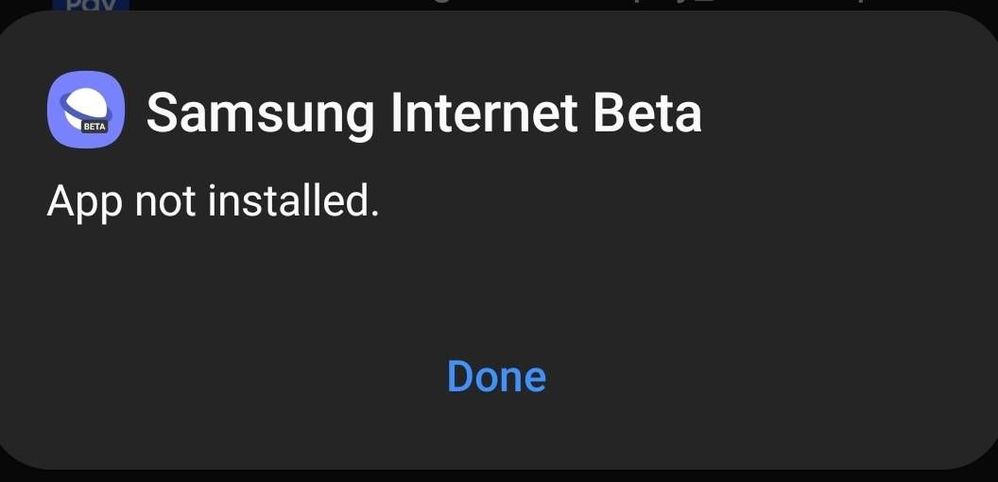
I'm getting the "App not installed" error when I try to install APK files in my Samsung Galaxy M51. The same apps are getting installed in other Samsung devices sporting the same Android 11 version. Is it due to app signature? Is there a way to resolve this issue from the device itself without signing the app?
Selected Answer
Chaman17
Active Level 8
07-22-2021 06:53 PM
in
https://r2.community.samsung.com/t5/Galaxy-M/Samsung-Internet-BETA-on-M31s/td-p/8976286
0 likes
IcyJay30
Expert Level 4
07-22-2021 06:32 PM
in
Even you can't update samsung apps manually in 💩core
IcyJay30
Expert Level 4
07-22-2021 06:37 PM
in
0 likes
AbishekNaagendra
Active Level 6
07-22-2021 06:44 PM
in
0 likes
IcyJay30
Expert Level 4
07-22-2021 06:55 PM
in
Chaman17
Active Level 8
07-22-2021 06:44 PM
in
0 likes
AbishekNaagendra
Active Level 6
07-22-2021 07:11 PM
in
Chaman17
Active Level 8
07-23-2021 04:46 AM
in
Just as apps of goodlock can't be installed on core devices, similarly beta can't be installed, I guess.
A word of advice though: Use lucky patcher appropriately since it might contain some malicious files,which may harm your device.
AbishekNaagendra
Active Level 6
07-23-2021 03:31 PM
in
Gurmeet1
Expert Level 4
07-23-2021 08:08 AM
in
0 likes
Anonymous User
Beginner Level 1
03-8-2022 04:56 AM
in
0 likes
RachelGomez123
Beginner Level 2
07-6-2022 02:07 PM
in
6 Ways To Fix App Not Installed Error
1. Changing App Permissions:
You can provide the necessary permissions to the Play Store to eliminate the app not installed error in the following way:
Go to the Settings application.
After that, go to the Applications/Apps in settings.
Now you need to tap on the three-dot menu and then click on the Reset App Preferences option.
Confirm the option again.
In this way, the app preferences will be reset and you will not see the app not installed error anymore if it was generated due to limited permissions.
2. Do Not Install From Untrusted Sources Other Than Google Play Store:
If you download an application from some other source except the Google Play Store, you should be sure that the source is genuine. Otherwise, the application files might be corrupt or contaminated. In this case, the app will not work and error is certain.
3. Delete Unnecessary Applications And Files:
Make sure that your device has enough space. To free the space, you can go to the application manager in the settings app and delete unwanted applications. Freeing up space will help the application you want to install to download properly without any error.
4. Take Care Of The Application Location:
It is suggested that you do not change the location of the application to be installed as the software chooses the location itself wisely. Some applications work fine when installed in internal storage while others are fine with SD card. So, do not change the location manually.
5. Disable The Google Play Product:
Google Play Store automatically blocks the applications that are not on the Play Store which can also result in the app not installed error. You can fix this in the following way:
Open the Google Play Store Application.
Choose the hamburger menu present on the top left.
Open the Play Product option.
Go to the Settings option present at the top right corner.
n device for security threats by clicking on the toggle. You can also turn it on back again after installing the desired application.
6. Reboot Your Device:
If none of the above-mentioned ways work, there might be some operation running in the background causing the error. This can be fixed by turning off your device and then starting it again. Try this way, I hope it will result in the elimination of the error.
Regards,
Rachel Gomez
0 likes
Willjoe
Active Level 1
07-27-2022 05:20 AM
in
Insufficient Storage- If your Android device is too full, it causes the package installer to malfunction, leading to the 'App not Installed' pop-up. Even a corrupted Internal Storage Card or an SD card which is not mounted properly may lead to clogged storage and thus give you the App not installed error message
Regards,
Will
0 likes
Jameswalter
Active Level 4
11-10-2022 09:17 AM
in
Home Support How to Fix Android App Not Installed Error
How to Fix Android App Not Installed Error
This post aims at telling you 6 tips to fix Android app not installed error. If you are stuck in Android app not installed error, those solutions are helpful.
Author Avatar Joy Taylor Last Updated: Oct. 26, 2022
Android Issues & Fixes
Android System Issues
Android Apps Issues
App Not Installed
Apps Keep Crashing
Start Optimizing App
Can’t Send Messages
Messaging App Not Working
Google Play Error 504
Google Play Not Working
Pokemon Go GPS Signal not Found
Samsung Phone Issues
DroidKit – Android Repair Tool
Free download DroidKit to repair system problem for Android device. No need to root your device. No technical skills are required.
Free Download
I have a program working in the Android Emulator. Every now and again I have been creating a signed .apk and exporting it to my HTC Desire to test. It has all been fine. On my latest exported .apk I get the error message ‘App not installed’ when I try to install the .apk. What can I do with this issue?
Many Android users would like to install an app with a .apk file extension to their Android phone from Google Play or somewhere, and Google Play Store may get stuck on downloading, get the error message “Application not installed”, or installed apps not showing on the home screen. Also, the “App not installed” error may pop up as the above user described. Then, what to do when trying to install an APK it says “app not installed”?
Android App Not Installed for This User
Android App Not Installed for This User
Knowing the reasons why apps not installed on Android occur is the first step to solving this problem. Here in this post, we will introduce what causes apps not installed on Android and how to fix the Android 11/12 app not installed error, or other Android OS versions.
Also Read: How to Open APK Files on PC >
Why Android App Not Installed Error Occurs
Fix App Not Installed on Samsung for System Problems
How to Fix App Not Installed on Android with Regular Ways
Why is My Phone not Installing Apps
1. Insufficient Storage
When you’re trying to install apps on your SD card or phone storage, the downloaded app certainly can’t be installed usually caused by storing too much data on your Android phone. Insufficient storage also can lead to Android system update failure, Android process system isn’t responding, etc.
2. Corrupted/Contaminated App File
Besides, the app not installed may mean that you downloaded corrupted files. If you download apps from somewhere else than Google Play Store, app files usually can’t be installed on your device smoothly. It is OK to download apps from other platforms, you just need to check their extension name and make an effort not to install contained files.
3. Storage Location
Apps work best when they are stored on an Android phone’s internal memory and some apps can only be stored in the device’s internal storage. If you don’t save the app in an appropriate location, it is sure that Android app not installed error would occur.
Regards,
James
0 likes
Jameswalter
Active Level 4
11-10-2022 09:18 AM
in
Home Support How to Fix Android App Not Installed Error
How to Fix Android App Not Installed Error
This post aims at telling you 6 tips to fix Android app not installed error. If you are stuck in Android app not installed error, those solutions are helpful.
Author Avatar Joy Taylor Last Updated: Oct. 26, 2022
Android Issues & Fixes
Android System Issues
Android Apps Issues
App Not Installed
Apps Keep Crashing
Start Optimizing App
Can’t Send Messages
Messaging App Not Working
Google Play Error 504
Google Play Not Working
Pokemon Go GPS Signal not Found
Samsung Phone Issues
DroidKit – Android Repair Tool
Free download DroidKit to repair system problem for Android device. No need to root your device. No technical skills are required.
Free Download
I have a program working in the Android Emulator. Every now and again I have been creating a signed .apk and exporting it to my HTC Desire to test. It has all been fine. On my latest exported .apk I get the error message ‘App not installed’ when I try to install the .apk. What can I do with this issue?
Many Android users would like to install an app with a .apk file extension to their Android phone from Google Play or somewhere, and Google Play Store may get stuck on downloading, get the error message “Application not installed”, or installed apps not showing on the home screen. Also, the “App not installed” error may pop up as the above user described. Then, what to do when trying to install an APK it says “app not installed”?
Android App Not Installed for This User
Android App Not Installed for This User
Knowing the reasons why apps not installed on Android occur is the first step to solving this problem. Here in this post, we will introduce what causes apps not installed on Android and how to fix the Android 11/12 app not installed error, or other Android OS versions.
Also Read: How to Open APK Files on PC >
Why Android App Not Installed Error Occurs
Fix App Not Installed on Samsung for System Problems
How to Fix App Not Installed on Android with Regular Ways
Why is My Phone not Installing Apps
1. Insufficient Storage
When you’re trying to install apps on your SD card or phone storage, the downloaded app certainly can’t be installed usually caused by storing too much data on your Android phone. Insufficient storage also can lead to Android system update failure, Android process system isn’t responding, etc.
2. Corrupted/Contaminated App File
Besides, the app not installed may mean that you downloaded corrupted files. If you download apps from somewhere else than Google Play Store, app files usually can’t be installed on your device smoothly. It is OK to download apps from other platforms, you just need to check their extension name and make an effort not to install contained files.
3. Storage Location
Apps work best when they are stored on an Android phone’s internal memory and some apps can only be stored in the device’s internal storage. If you don’t save the app in an appropriate location, it is sure that Android app not installed error would occur.
Regards,
James
0 likes