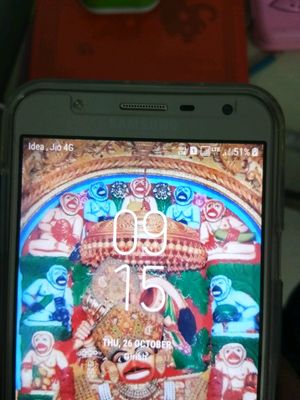
title:

lock screen clock

(Post creation time:  

10-26-2017 03:55 PM

)

648 Views

R

RBaldevji

Active Level 1

last edited


03-15-2019 09:21 AM


in

 
how can I change - lock screen clock location & view (hr:min) in single line. If possible please help in change the screen lock clock view.f7ce94c2-dd59-46b6-a3cb-4725b8b4026c.jpg
    • N

      naman38

      Active Level 3

      10-26-2017 05:35 PM


      in

       
      go AOD and change

      0 likes

      R

      RBaldevji

      Active Level 1

      10-26-2017 05:56 PM


      in

       
      what means ADO? I am having Samsung galaxy j7Next

      0 likes

    • N

      naman38

      Active Level 3

      10-26-2017 06:07 PM


      in

       
      always on display

      0 likes

    • A

      ashishsingh

      Active Level 8

      10-26-2017 06:16 PM


      in

       
      You can't change lock screen clock. AOD also can't change it

      0 likes

    • R

      RBaldevji

      Active Level 1

      10-26-2017 07:18 PM


      in

       
      only left and right sides app's notifications can be changed on lock screen with APP shortcuts. ( but cannot change or remove the clock)58cb583a-fb92-4000-a5aa-5de93e67a5fd.jpg

      0 likes

    • A

      admin_

      Expert Level 5

      10-30-2017 07:53 AM


      in

       
      Thanks for being with Samsung and for sharing your query. We would like to inform you that when there are notifications in lock screen, then time comes in single line else it comes in stacked view. There is no particular option to change it.

      0 likes

    Related Content

    lock screen clock

    lock screen clock

    lock screen clock

    lock screen clock

    Lock screen clock