
title:

battery charging issue

(Post creation time:  

9 years ago

)

596 Views

V

ViaSandeep

Active Level 6

last edited


8 years ago


in

 
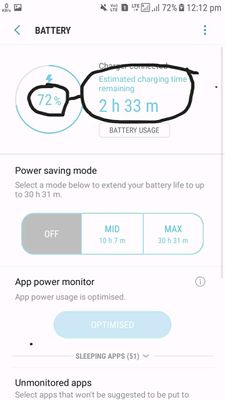
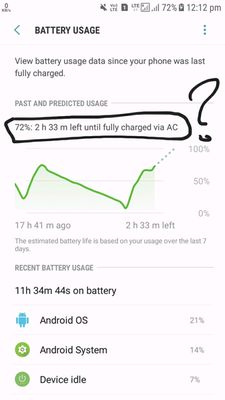
Sir, my 'Samsung Galaxy J5 2016' edition is now taking too much time for being fully charged. it charges at a normal speed till 70%..then it starts taking about 3-4 hours to charge the rest 30%. why is it so ?
when i checked the setting it shows it is charging on AC current. is it normal type or does it requires DC current ?
I'm charging it with common household electricity and not on inverter or else chargeable things.
please reply me with solution. cda029e4-0acb-4946-a0ff-95d94d2b5474.jpg
a979749c-edb4-4138-9a15-aa12d48d09b2.jpg
  • I

    iamraj123

    Active Level 5

    9 years ago


    in

     
    ac means alternated current means electricity in your house is reduced to very low voltage using mobile charger.there is no problem in that your mobile contains small battery and its voltage is less for mobile so AC is used
    V

    ViaSandeep

    Active Level 6

    9 years ago


    in

     
    Yes. but i got confused when I noticed the time left until full charge on AC.
    But Thank you Brother for clearing.

    0 likes

    A

    AbhijithSB

    Active Level 9

    9 years ago


    in

     
    It's the other way around, the higher voltage AC is converted to lower voltage DC by the charger. A battery cannot be charged directly on AC, regardless of voltage.

    0 likes

  • A

    admin_

    Expert Level 5

    9 years ago


    in

     
    We do apologize for the slow charging issue facing in the device. The relevant department will serve you better, if you can provide logs/video within 15 minutes of issue occurrence by registering this feedback in Error Section (Samsung Members App -> Feedback -> Questions/Errors -> Create -> Error reports). Be sure to hit ♡ when you find an answer that works for you.

    For Further assistance, you can get in touch with us via Live Chat option by following- http://livechat.support.samsung.com/Customer_new/IN. You can also connect us via Samsung Members web community by following mentioned url-https://community.samsungmembers.com/en_IN#/
  • H

    harriya

    Active Level 7

    8 years ago


    in

     
    you should uninstall (clear data first,then uninstall) or force stop(clear cache first then force stop) unused and unusual apps, clear caches, clear RAM, optimizing battery by putting apps sleep, force stop or disable unused useless preloaded apps...samsung apps,Microsoft apps and Google apps like chrome as it consumes more Ram and background data which results in heavy battery drain,,instead use browser, browser will take less Ram..(eg..via browser under 500KB)..clear or delete useless folder or duplicate folder in file manager... don't install apps from other stores and sites, it will cause your phone damage ..if you install these apps then uninstall it..do all these thing atleast once a day for better results...change your data cable and install led blinker notification app, the phone will take less time to charge i am doing this in my j7 16(sAmoled display) and it works perfectly around 20% to 100% in 1:40 or 1:45 hour.... https://play.google.com/store/apps/details?id=com.ledblinker
    V

    ViaSandeep

    Active Level 6

    8 years ago


    in

     
    thanks man😊

    0 likes