
title:

Theme Store icon

(Post creation time:  

04-16-2017 06:27 AM

)

262 Views

S

saurav

Active Level 7

last edited


03-15-2019 09:18 AM


in

 
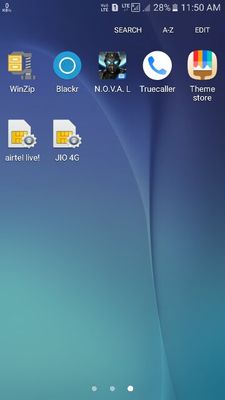
Hello guys i had visited the samsung theme store...there was this option for adding the theme store icon there...i accidently pressed it and got the theme store icon...but now i cant remove this icon...is there a way to remove this icon...see the screenshot6550cef7-0d00-496f-b21a-1817992a9f15.jpg
    • D

      Devcool

      Active Level 5

      04-16-2017 07:02 AM


      in

       
      Yes ....... Go to setting> Application> application manager> application info> search for theme and click on it > Force stop and uninstall updates > Done

      0 likes

      S

      saurav

      Active Level 7

      04-16-2017 07:13 AM


      in

       
      It worked...thanks for the help

      0 likes

    • D

      Devcool

      Active Level 5

      04-16-2017 07:14 AM


      in

       
      Ok

      0 likes

    • S

      Samsung_India_

      Active Level 10

      04-17-2017 07:33 AM


      in

       
      Thank you for sharing your query. We are happy to see that we have such a platform where members can ask their queries and other members are trying to responding another one. We appreciate your loyalty, thanks for sharing your concerns with the Community!

      0 likes

    Related Content

    theme store

    improve theme store

    theme store

    Theme store