
Today I faced a problem.
As soon As I using my samsung galaxy j7 nxt a popup window open and showing invalid input.
an error in application.
why this is happened.
this appears in every minutes and leaves after 5-10 second.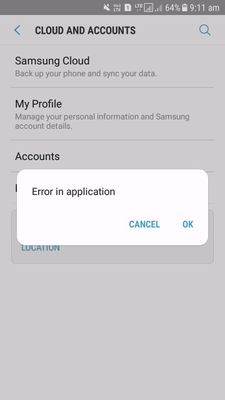
As soon As I using my samsung galaxy j7 nxt a popup window open and showing invalid input.
an error in application.
why this is happened.
this appears in every minutes and leaves after 5-10 second.
s01gautam
Active Level 6
01-16-2018 06:25 AM
in
0 likes
rsamandeep
Active Level 7
01-16-2018 07:47 AM
in
see this http://tinyium.com/2scp
0 likes
admin_
Expert Level 5
01-16-2018 02:40 PM
in
1) Navigate to Settings >> Apps >> Press on More >> Reset App Preferences
2) Run your device in Safe Mode to check the issue
3) Keep updating the device if available.
4) Take full data back up and reset the device.
Be sure to hit ♡ when you find an answer that works for you.
0 likes
bika
Beginner Level 2
05-2-2018 05:10 PM
in
0 likes
bika
Beginner Level 2
05-2-2018 05:10 PM
in
0 likes
sat12
Beginner Level 2
09-19-2020 08:11 PM
in
a pop up shows airtel live! invalid input. how to resolve it
0 likes
KakarlaMaheshbabu09
Beginner Level 2
10-2-2020 10:23 AM
in
Same problem to me also please give me solution
0 likes
cs-member13
Expert Level 4
10-25-2020 06:14 AM
in
Dear Samsung Member,
Greetings from Samsung Customer Support!
Hope your issue got resolved but if not then to resolve the issue please follow below given steps:-
1. Check device in safe mode:- Using Safe Mode on a Samsung phone allows you to force the device to run the essential operating system, and disable most 3rd party applications.
To enter in safe mode:- Press and hold the Power key, when Power off icon appears > Press and hold the power off icon.
To exit safe mode restart the device.
2. Reset the device:- Before resetting, kindly create data backup of your device via SMART switch mobile application or http://www.samsung.com/in/support/smartswitch pc suite.
How to reset:- Settings > General management > Reset.
If the issue still persist, kindly register your concern in Samsung Members app along with short video, screenshot and error log file(Samsung Members app > Get help > Feedback > Error report/ask question).
Note: Please send device log files within 15 minutes of issue occurrence along with the exact issue details.
Thank you for writing to Samsung.
Warm Regards,
Samsung Customer Support
0 likes
Yysgsgsgdgdcd
Beginner Level 2
05-12-2023 06:02 PM
in