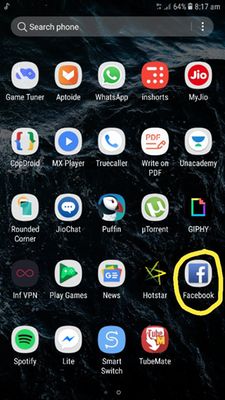
this is ready to install icon (stub version) only .. 150 kb size and other fb components 6 mb approx size... inside system memory which redirect to play store or Samsung app store ...
don't worry this is due to you select another theme (not default system theme) or may be change setting. just go to ... setting > display > icon frames > icons only
Thank you for reaching out to the Samsung community! We would like to inform you that after application update there must be change in icon and can be confirmed by the same application developer team.
Be sure to hit ♡ when you find an answer that works for you. For Further assistance, you can get in touch with us via Live Chat option by following- http://livechat.support.samsung.com/Customer_new/IN. You can also connect us via Samsung Members web community by following mentioned url-https://community.samsungmembers.com/en_IN#/

RAiiNote20Ultra5G
Active Level 10
05-16-2018 04:29 AM
in
0 likes
Dkay
Active Level 4
05-16-2018 04:39 AM
in
0 likes
Dkay
Active Level 4
05-16-2018 04:40 AM
in
0 likes
Dkay
Active Level 4
05-16-2018 04:40 AM
in
0 likes
SandeepDdn
Active Level 9
05-16-2018 05:07 AM
in
0 likes
Dkay
Active Level 4
05-16-2018 05:48 AM
in
0 likes
SandeepDdn
Active Level 9
05-16-2018 06:03 AM
in
just go to ... setting > display > icon frames > icons only
0 likes
Dkay
Active Level 4
05-16-2018 06:04 AM
in
0 likes
admin_
Expert Level 5
05-16-2018 11:08 AM
in
Be sure to hit ♡ when you find an answer that works for you. For Further assistance, you can get in touch with us via Live Chat option by following- http://livechat.support.samsung.com/Customer_new/IN. You can also connect us via Samsung Members web community by following mentioned url-https://community.samsungmembers.com/en_IN#/
0 likes