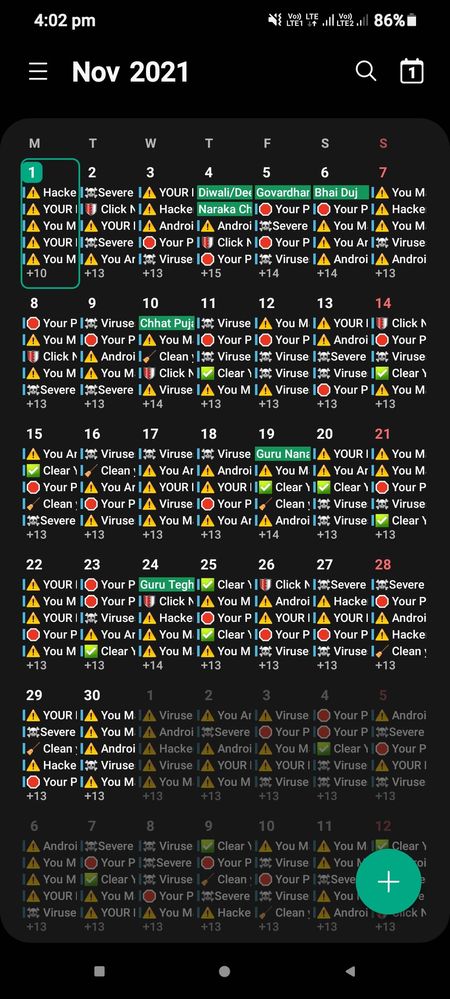
TURN OFF SYNCING OF CALENDAR APP AND CLEAR DATA AND CACHE OF CALENDAR APP NOW CHECK STILL PROBLEM IF YES THEN RESTAR(REBOOT) YOUR DEVICE ONCE AND CHECK AGAIN
Go to Settings 》Apps 》enable show system apps 》Search calendar 》clear data of Calendar app, calendar storage app and google calendar sync. The restart your Device. It will be solved
We acknowledge your query and apologize for the same. Please perform the below mentioned steps to resolve the issue:
* Check app cache: Clear cache memory of a particular application: Setting >Apps >Now pick the app. For example 'Samsung Internet' >Storage >Clear Cache.
For further assistance, register your concern in Samsung Members Application (Open Samsung Members Application > Get help > Send Feedback > Error report/Ask questions).

vasanth31
Beginner Level 2
5 years ago
in
0 likes
joshibhai
Active Level 5
5 years ago
in
0 likes
RαʝҽʂԋKυɱαɾ21
Expert Level 5
5 years ago
in
NOW CHECK STILL PROBLEM
IF YES THEN
RESTAR(REBOOT) YOUR DEVICE ONCE AND CHECK AGAIN
0 likes
joshibhai
Active Level 5
5 years ago
in
0 likes
Chanakya_Reddy
Expert Level 3
5 years ago
in
0 likes
joshibhai
Active Level 5
5 years ago
in
0 likes
Anonymous User
Beginner Level 1
5 years ago
in
And see in Safe mode if it shows.
Samsung_Support2
Expert Level 3
5 years ago
in
Dear Samsung Member,
Greetings from Samsung Customer Support!
We acknowledge your query and apologize for the same. Please perform the below mentioned steps to resolve the issue:
* Check app cache: Clear cache memory of a particular application: Setting >Apps >Now pick the app. For example 'Samsung Internet' >Storage >Clear Cache.
For further assistance, register your concern in Samsung Members Application (Open Samsung Members Application > Get help > Send Feedback > Error report/Ask questions).
Thank you for writing to Samsung.
Warm Regards,
Samsung Customer Support
0 likes