We acknowledge your query and apologize for the inconvenience caused to you and will surely assist you regarding the same and please follow the easy troubleshooting steps which might help to solve the issue.
Wi-Fi calling allows to make and receive calls & texts (SMS & MMS) over a Wi-Fi connection. No separate app or log-in or number is needed.
Wi-Fi calling must have the following requirements: Access to a Wi-Fi router with a high-speed internet connection (Any ISP Router). Wi-Fi calling should be enabled on smartphones. The latest software needs to be updated. The Wi-Fi calling switch should be on.
You should use airtel 4G SIM (VoLTE Support) Or JIO SIM Card + VOWIFI should be enabled for the user by the operator end as well. For a seamless experience, you should keep both VoLTE and Wi-Fi calling switched on.
Method 1: To enable Wifi calling feature via settings: Step 1: Navigate to the app's screen and tap on Settings. Step 2: Tap on Connections. Step 3: Tap on Wi-Fi Calling. Step 4: Turn on Wifi Calling. Step5: Wi-Fi Calling feature has been turned on.
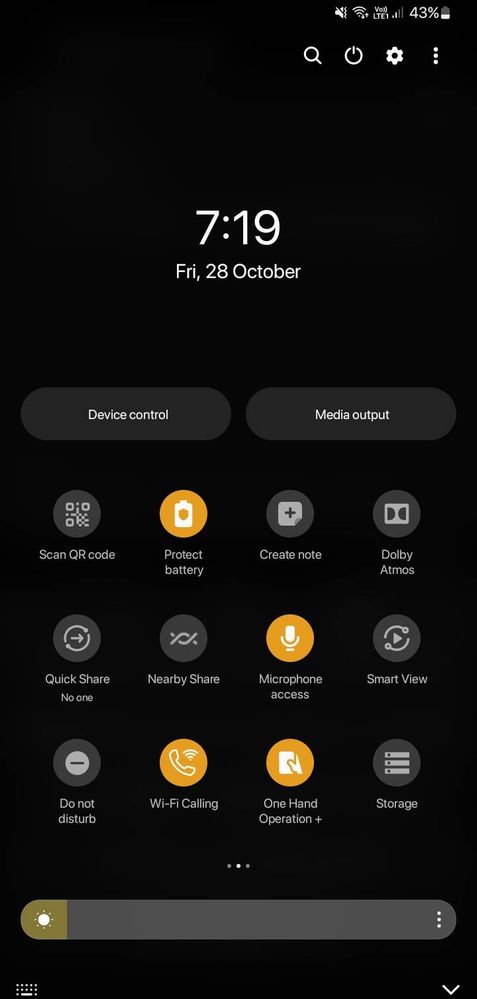
Method 2: Scroll down the notification panel and turn on the Wi-Fi calling option.
Method-3: Menu>Apps>Phone app>Three vertical dots>Settings>WIFI calling>enable it.
In case the issue still occurs. Please register your concern in Samsung Members Application (Open Samsung Members Application > Get help > Send Feedback > Error report).
Thank you for writing to us. Warm Regards, Samsung Customer Support.
I have the same problem with my A51 dual sim. I am connected to a strong home internet, I have a wifi calling enabled sim, I spend an hour with my mobile service provider and they say the problem is not with the sim, I put my sim into my husband's A50 and could enable wifi calling. I have volte enabled in my phone. There is no Wifi calling toggle switch, nor is there a wifi calling icon when i pull down the menue from the top of the screen. Help.

anandushaji44
Active Level 7
4 years ago
in
0 likes
Siddhesh04
Active Level 5
4 years ago
in
0 likes
Siddhesh04
Active Level 5
4 years ago
in
0 likes
anandushaji44
Active Level 7
4 years ago
in
Or connect to another wifi.
For me, it works with mobile hotspots too.
0 likes
Siddhesh04
Active Level 5
4 years ago
in
0 likes
anandushaji44
Active Level 7
4 years ago
in
0 likes
cs_member8
Moderator
4 years ago
in
Dear Samsung member,
Greetings from Samsung customer support.
We acknowledge your query and apologize for the inconvenience caused to you and will surely assist you regarding the same and please follow the easy troubleshooting steps which might help to solve the issue.
Wi-Fi calling allows to make and receive calls & texts (SMS & MMS) over a Wi-Fi connection. No separate app or log-in or number is needed.
Wi-Fi calling must have the following requirements:
Access to a Wi-Fi router with a high-speed internet connection (Any ISP Router).
Wi-Fi calling should be enabled on smartphones.
The latest software needs to be updated.
The Wi-Fi calling switch should be on.
You should use airtel 4G SIM (VoLTE Support) Or JIO SIM Card + VOWIFI should be enabled for the user by the operator end as well.
For a seamless experience, you should keep both VoLTE and Wi-Fi calling switched on.
Method 1:
To enable Wifi calling feature via settings:
Step 1: Navigate to the app's screen and tap on Settings.
Step 2: Tap on Connections.
Step 3: Tap on Wi-Fi Calling.
Step 4: Turn on Wifi Calling.
Step5: Wi-Fi Calling feature has been turned on.
Method 2:
Scroll down the notification panel and turn on the Wi-Fi calling option.
Method-3:
Menu>Apps>Phone app>Three vertical dots>Settings>WIFI calling>enable it.
In case the issue still occurs. Please register your concern in Samsung Members Application (Open Samsung Members Application > Get help > Send Feedback > Error report).
Thank you for writing to us.
Warm Regards,
Samsung Customer Support.
0 likes
Siddhesh04
Active Level 5
4 years ago
in
0 likes
sthomp
Beginner Level 2
4 years ago
in
I have the same problem with my A51 dual sim. I am connected to a strong home internet, I have a wifi calling enabled sim, I spend an hour with my mobile service provider and they say the problem is not with the sim, I put my sim into my husband's A50 and could enable wifi calling. I have volte enabled in my phone. There is no Wifi calling toggle switch, nor is there a wifi calling icon when i pull down the menue from the top of the screen. Help.