
I have the Facebook app in my Galaxy A51. It cannot be uninstalled. So I did everything I could to stop it. I did not allow any permissions, restricted battery usage, restricted data usage, cleared data and cache, force stopped it and disabled it. But yet when I go to the Developer Options and see the running services I always see Facebook Services running in the background. Even after stopping Facebook Services from the Developer Options itself, it still starts running in the background after half an hour or so. Why is it still running in the background even after restricting data usage? Is there no way to permanently disable it and stop it from running in the background? Why is it not possible to uninstall Facebook?
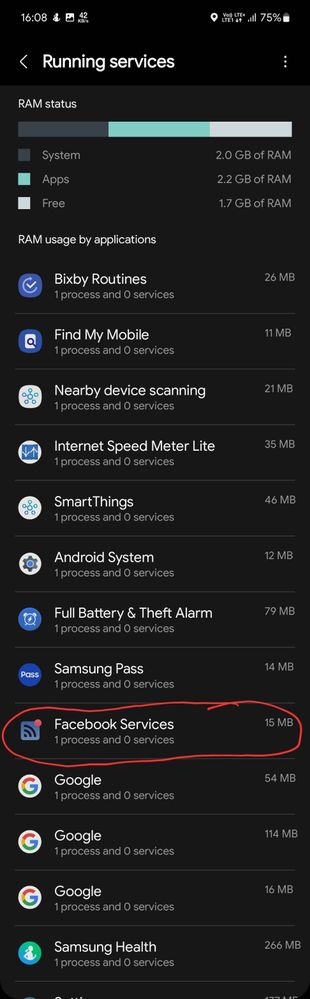
The screenshot
Kshitij5050
Active Level 5
06-22-2022 12:03 PM
in
Go to apps find it and disable it
0 likes
triaasteria42
Active Level 6
06-22-2022 12:07 PM
in
0 likes
VedantKalore
★
06-22-2022 12:48 PM
in
Have you ever noticed that for ex you went to some store and were looking for some dresses and you tryed and took pics to compare but but notice that you will see ads and recommendations about same sort of stuff . That's why Facebook exists
SDC-X
Active Level 7
06-22-2022 02:48 PM
in
Sid_Karna
Expert Level 5
06-22-2022 03:51 PM
in
Sid_Karna
Expert Level 5
06-22-2022 03:53 PM
in
SDC-X
Active Level 7
06-22-2022 02:54 PM
in
cs_member8
Moderator
06-29-2022 10:52 AM
in
Dear Samsung Member,
Greetings from Samsung Customer Support!
We acknowledge your query and apologize for the same. Please perform the below mentioned steps to resolve the issue:
* Check app cache: Clear cache memory of a particular application: Setting >Apps >Now pick the app. For example 'Samsung Internet' >Storage >Clear Cache.
For further assistance, register your concern in Samsung Members Application (Open Samsung Members Application > Get help > Send Feedback > Error report/Ask questions).
Thank you for writing to Samsung.
Warm Regards,
Samsung Customer Support
0 likes
cs_member8
Moderator
06-29-2022 10:52 AM
in
Dear Samsung Member,
Greetings from Samsung Customer Support!
We acknowledge your query and apologize for the same. We request that you kindly visit the service center for a physical inspection of your device. You can locate your nearest service center with this given link: https://www.samsung.com/in/support/service-center/
Thank you for writing to Samsung.
Warm Regards,
Samsung Customer Support
0 likes
cs_member8
Moderator
06-29-2022 10:53 AM
in
Dear Samsung Member,
Greetings from Samsung Customer Support!
We acknowledge your query and apologize for the same. To resolve your device hanging issue please visit this link: https://www.samsung.com/in/support/mobile-devices/how-to-restart-the-device-when-freezed-or-hanged/
In case the issue still occurs. Please register your concern in Samsung Members Application (Open Samsung Members Application > Get help > Send Feedback > Error report/Ask questions).
Thank you for writing to Samsung.
Warm Regards,
Samsung Customer Support
0 likes
ArchLinux
Active Level 3
10-7-2023 06:05 PM
in
Unfortunately, this doesn't remove it from /system since you don't have write access. But it does stop the service and remove it from apps list.
Also remember to turn off "Remove apps for all users" in Universal Debloater
0 likes