
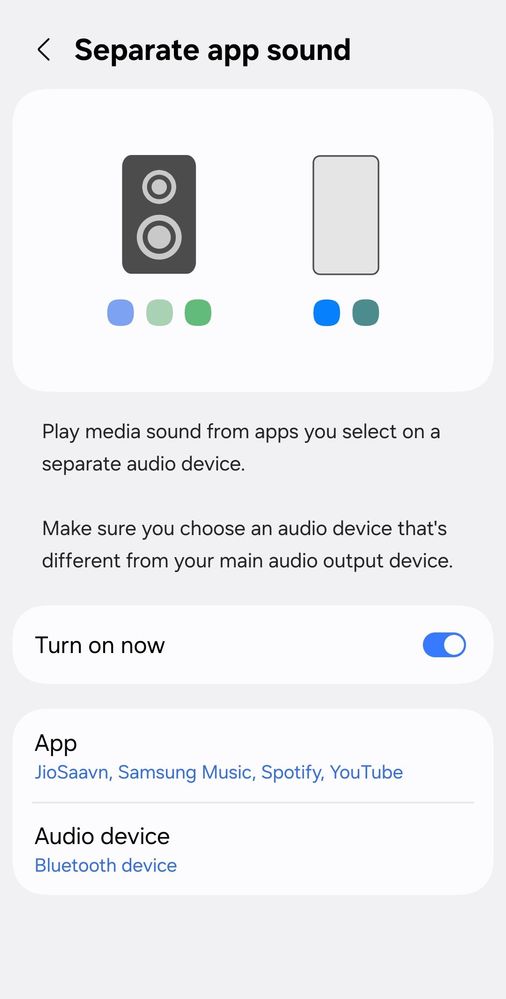
Separate app sound means the sound can be played through both bluetooth and speaker. The settings are applied as pper the attached image but, still the sound plays through bluetooth for not selected app and the another apps sound stops. This is something which is abnormal. Please guide to fix this.
cs_member10
Moderator
10-27-2025 04:07 AM
in
Dear Samsung Member,
Greetings from Samsung Customer Support!
As per your query, we want to inform you that the Set the device to play media sound from a specific app on the connected Bluetooth speaker or headset. For example, you can listen to the Navigation app through your device’s speaker while listening to playback from the Music app through the vehicle’s Bluetooth speaker.
Please perform the below-mentioned steps to use the Separate app sound in Samsung Galaxy Mobile.
Step 1. Open the Settings.
Step 2. Select Sounds and vibration.
Step 3. Select Separate app sound.
Step 4. Tap the switch to turn on.
Step 5. Tap Select.
Step 6. Select the multimedia app you would like to hear sound from on a different device. Then, tap Back.
Step 7. Select the Audio device you want to use for this app. Bluetooth devices will only be shown while they’re connected. Then, tap Back.
Note: Separate app sound only works when the audio device selected is different from your device’s main audio output device.
If the issue persists, kindly report the problems with a log file. To share a log file, click on the Samsung Members Application (Open Samsung Members Application > Support> Tap on send feedback> Choose Composer> Select error report> Select the appropriate issue category> Type your query and send.)
Warm Regards,
Samsung Customer Support
0 likes