
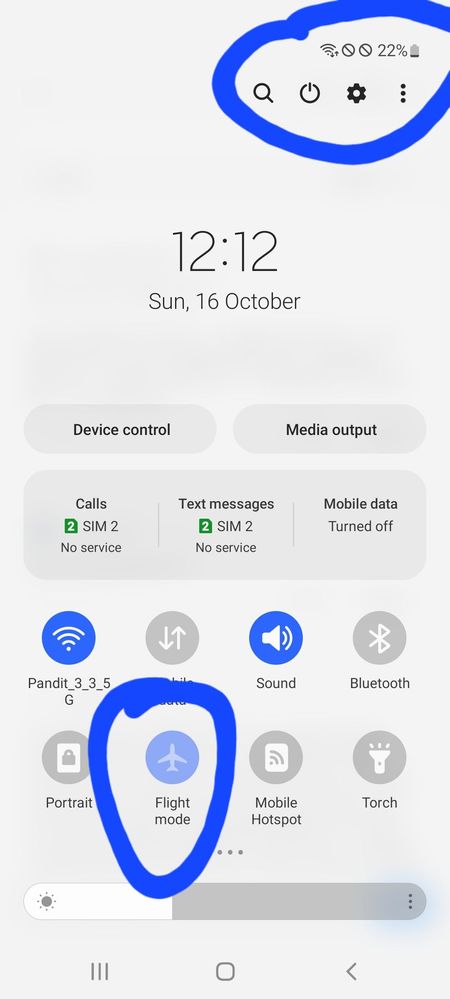
Hey samsung after today's update and installation of that update in my A52s the flight mode is stuck in light blue colour and here is no network. I have tried all the measures suggested my samsung executive over whatsapp but nothing happened @
Worst experience ever , before this device I had phone of worth 14000 , it never occurred any such problem
But here the basic use of phone that is to call is prohibited by no network pathetic
ѵօϲɑӀ4ӀօϲɑӀ
★★
10-16-2022 09:19 AM
in
0 likes
Divyansh17
Active Level 2
10-16-2022 09:25 AM
in
0 likes
ѵօϲɑӀ4ӀօϲɑӀ
★★
10-16-2022 11:08 AM
in
0 likes
ɪʀᴏɴ_ᴅᴇᴘᴘ
Active Level 5
10-16-2022 09:23 AM
in
0 likes
Divyansh17
Active Level 2
10-16-2022 09:36 AM
in
Kunal2
Expert Level 1
10-16-2022 11:26 AM
in
0 likes
Divyansh17
Active Level 2
10-16-2022 11:28 AM
in
YashpalBharti
Active Level 1
10-16-2022 10:33 AM
in
Power button + volume down/up
According to your device
0 likes
JerinJohn
Active Level 6
10-16-2022 11:33 AM
in
0 likes
CODM6567
Expert Level 5
10-16-2022 02:07 PM
in
0 likes
Divyansh17
Active Level 2
10-16-2022 02:11 PM
in
0 likes
Jameswalter
Active Level 4
10-17-2022 07:09 AM
in
Methods to Turn off Airplane Mode. Before you troubleshoot the issue, try restarting your computer.
Reset Your Network.
Change Your Wi-Fi Adapter's Power Management Settings.
Disable the Radio Management Service.
Check for Driver Updates.
Regards,
J Wick
0 likes
anujrawat64
Active Level 1
10-17-2022 05:57 PM
in
0 likes
cs_member8
Moderator
10-29-2022 09:49 PM
in
Dear Samsung Member,
Greetings from Samsung Customer Support!
We acknowledge your query and apologize for the inconvenience caused to you and will surely assist you regarding the same. We would request you to register your concern in Samsung Members Application. So, our concern team gets back to you as soon as possible.
Please follow this path to register your concern in Samsung Members Application (Open Samsung Members Application > Get help > Send Feedback > Error report).
Note. please attach the error log file within 15 minutes of the error occurring.
Thank you for writing to Samsung.
Warm Regards,
Samsung Customer Support
0 likes