
The display has shrunk from the uper and lower margin of my Samsung A50. It has shifted down from the uper border and shifted upwards at the lower border. About 5mm from each side (Upper and Lower).
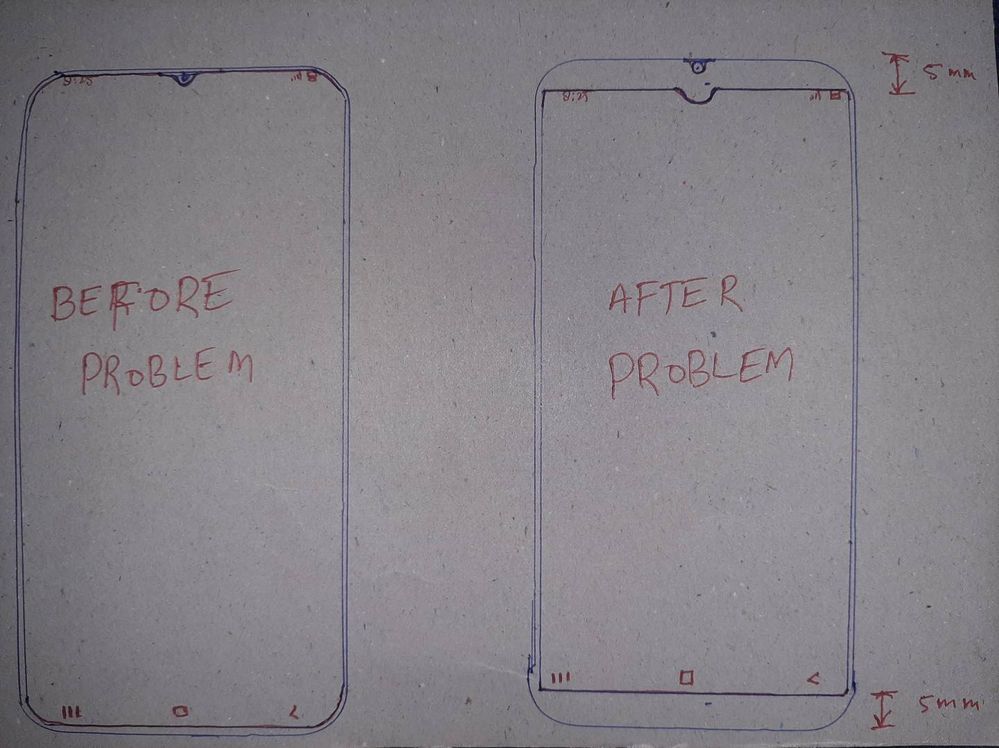
What to do please help...
Selected Answer
ѵօϲɑӀ4ӀօϲɑӀ
★★
6 years ago
in
To goto Safe mode, Press and hold Power Button, When power menu pops up on screen touch and hold Shut down/Power Off for sometime.
Then phone will ask to reboot in Safe mode.
Chk there is the Display is okay there (Which I am sure will be) Reset phone settings once.
If issue isn't resolved reply me.
Zeeshan123123
Active Level 2
6 years ago
in
i did it after reading your comment, and it worked. I was trying to make it work for a whole day now, called Samsung smart tutor too but they couldn't help me out. Thank you so much!
But, when i exit the safe mode, problem starts again. What should i do now?
ѵօϲɑӀ4ӀօϲɑӀ
★★
6 years ago
in
Zeeshan123123
Active Level 2
6 years ago
in
Problem Solved, Thank you 😅
Selected Answer
Ehsank
Expert Level 5
6 years ago
in
steps to turn safemode;
long press on power button>
long press on power off option>click on safemode >your mobile will restart and turn into safemode.
Ehsank
Expert Level 5
6 years ago
in
Zeeshan123123
Active Level 2
6 years ago
in
Ehsank
Expert Level 5
6 years ago
in
0 likes
Selected Answer
ѵօϲɑӀ4ӀօϲɑӀ
★★
6 years ago
in
0 likes
Anikroyale
Expert Level 5
6 years ago
in
0 likes
Abhishek13892
Expert Level 3
6 years ago
in
Sonesha
Active Level 5
6 years ago
in
0 likes