
No music lovers want loud Notification sound interrupting between their favorite tracks while playing on external speakers! And we also don't want intruding alerts in between video playback from external speakers. That's why Note 9 lets us separate alert sound from the speaker sound and limit to the phone output, making alerts almsot as negligible as a little beep sound unlike loud sound in between songs.
Isn't it cool? It's super easy too! Try these steps (in screenshots).
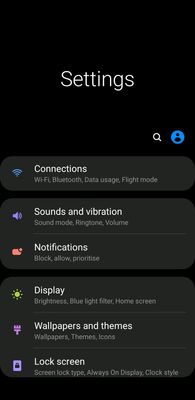
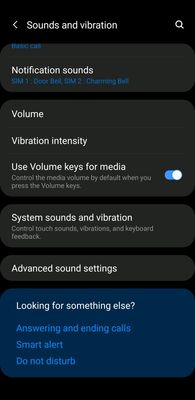
Sounds and vibrations > Advanced settings > tap Separate App Sound.
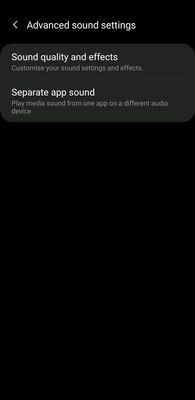
Toggle the button to the right to enable this tool.
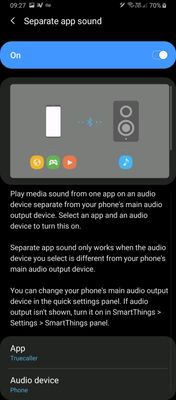
Choose any app whose Notification sound you want to turn down and add as per your choice.
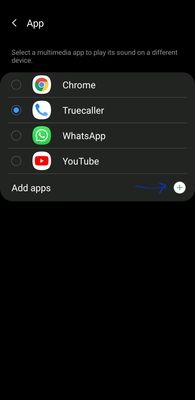
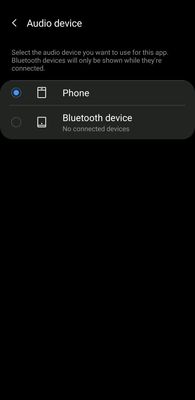
Go back, select phone device to filter the alert sound from the speaker while playing music, podcasts or videos.
Make sure you never remove Samsung Smart Things from your phone or else, you'll lose access to this option.
Has anyone thought of this before? Well, Samsung literally thought of it because it cares about little things ❣
Isn't it cool? It's super easy too! Try these steps (in screenshots).
Sounds and vibrations > Advanced settings > tap Separate App Sound.
Toggle the button to the right to enable this tool.
Choose any app whose Notification sound you want to turn down and add as per your choice.
Go back, select phone device to filter the alert sound from the speaker while playing music, podcasts or videos.
Make sure you never remove Samsung Smart Things from your phone or else, you'll lose access to this option.
Has anyone thought of this before? Well, Samsung literally thought of it because it cares about little things ❣